Out-bound call (manual line reservation)

Top  Previous  Next
Trading and C&C > Turret Proxy To Open communication (TPO) > DDI Sharing > DDI Lines Sharing > Usage > Telephony functions > Common

Shared DDI lines can be used to reach any distant party by calling its external telephony lines, its mobile numbers or its internal phones extension.

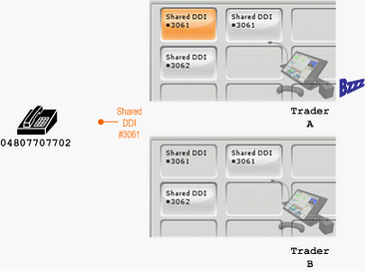
TraderA must first seize the line by pressing one of the idle DDI slot keys.  The selected key background colour switches to orange; the dial tone is played on the active device e.g. handset or speaker channel.

On other traders’ turret, the key associated to the same DDI slot is shown locked and is not accessible anymore until the call-out sequence starts.


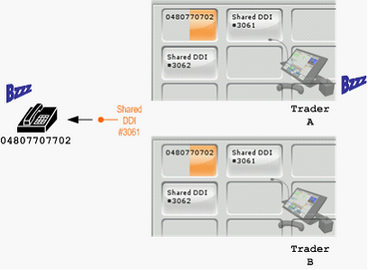
TraderA can then dial the extension of the remote party.  He can press a shortcut/contact key, an entry in the corporate directory or enter the phone number manually using the dial pad.  

The call-out sequence is initiated.


The background of the DDI slot starts flashing orange and the called extension is displayed on the key.


Only TraderA hears the ringing tone and can follow the progress in the call status area.


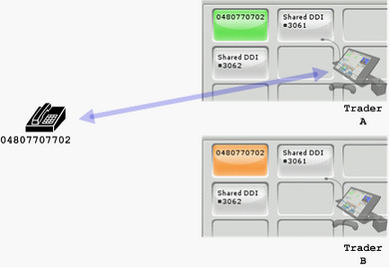
Upon completion of the call-out sequence, the speech path is established between the turret and the remote party; the background of the DDI slot is displayed solid green and the label shows the identity of the called party.

There is no speech path opened on other traders’ turret; the DDI slot background is solid orange and shows the same information than on TraderA’s turret.


Note

(1)The call-out sequence can be aborted only by the trader who initiated it.  This is done be pressing the End while the handset is in ringing state.

(2)When an error occurs during the call-out sequence, the reason code or message is displayed only on TraderA’s turret.

(3)TraderB is allowed to join while the line is still in ringing and will be part of the conversation once the call is established.