On-the-fly setup of DDI lines


On-the-fly setup of DDI lines |
|
| Trading and C&C > Turret Proxy To Open communication (TPO) > DDI Sharing > DDI Lines Coverage > Usage |
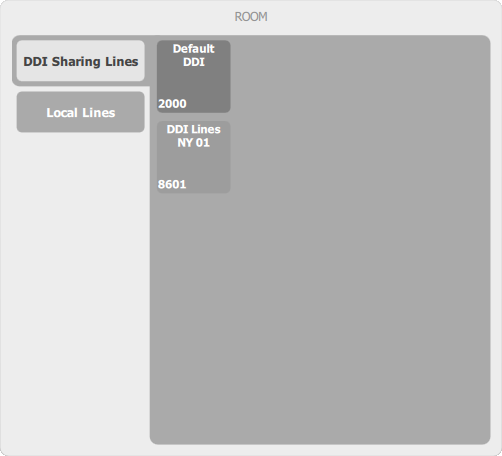
User's DDI lines are listed in the Room panel, along with his direct lines and his presence groups, inside a DDI Sharing Lines tab.
Each line appears with its display name and its extension number. The trader's default DDI line appears first, and the other DDI lines are sorted by extension number. An "active" button indicates that the trader is currently registered to line notifications; otherwise the line button is grayed out.
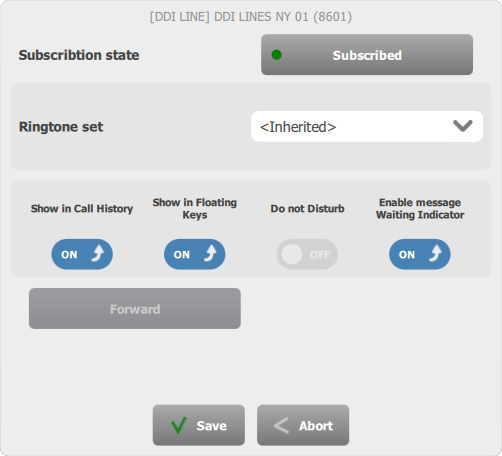
From this panel, a long press (more than two seconds) on a line button brings the DDI Line configuration panel, as shown below.
The trader can, at any time, subscribe, monitor or unsubscribe the line hence displaying respectively subscribed, monitored or no set of properties. The ringtone set associated to the line can be changed. The trader can decide whether the local calls hosted on that line are logged in his Call History, and appear in his Floating Keys. User may also select whether he wish to monitor message waiting on this line(MWI). For inherited DDI lines, the small arrow in buttons means that currently user have the default inherited value. If user change the value the arrow will disappear. If the line is the trader's default DDI line (a property of the line which can be set in the line edition form on the administration console), or if the setting key Advanced call handling on all DDI lines (see the Configuration section below) is enabled, the panel also allows to enable the Do Not Disturb and Call Forward features on the line. The changes are applied once the trader presses the Save button. |