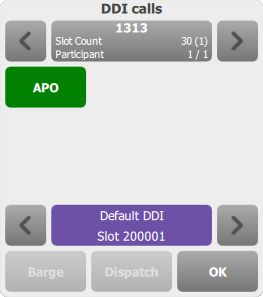
DDI line call browsing


DDI line call browsing |
|
| Trading and C&C > Turret Proxy To Open communication (TPO) > DDI Sharing > DDI Lines Coverage > Usage |
Back on the Room panel, a single short press on a registered line brings the DDI calls popup applet on the screen.
This applet displays information on a particular DDI line, showing its display name. The lower part of the panel allows browsing the different slots available for this line with the lower arrows, and the current slot extension and state color are displayed. The upper part of the applet lists the participants involved in the call on the current slot, if any (5), with the upper arrows to browse them if they are more than 6. The upper display area shows the display name of the call on the current slot, the total number of slots on the line, and the participants count. From this panel, pressing the current slot button will either initiate a new call on this slot if the slot is free, or join the slot if it is currently hosting a call. |