Quick start


Quick start |
|
| Software Solution > FlexCom |
Prerequisites
•The FlexCom installation package must be installed on the standard windows PC.
•The FlexCom requires one pair of audio devices (loudspeaker + microphone).
•As a VOIP application, it also needs an open running network connection.
Create Turret device
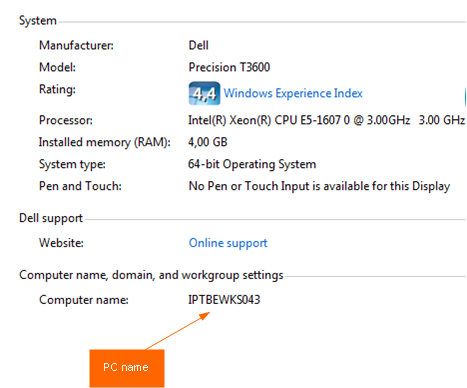
Before starting using the FlexCom, the corresponding Turret device must be created in the TSS. By default, the corresponding Turret device name for the FlexCom is the computer name of the PC Go to Control Panel, System and Security, System
Example: if the PC name is IPTBEWKS043, the user must create a Turret device named IPTBEWKS043. *
1.Go to TSS Administration console, Device Management, Turrets 2.Click on the Add new button, fill the Device Identifier with the PC name (IPTBEWKS043) 3.Save
* Warning : the Turret device name must be CAPITALIZED in TSS. e.g. computer name : smith-pc, turret device : SMITH-PC
Create FlexCom userFetch users from Windows domainConfigure LDAP Users search base. On the TSS Console, in Account Management > Users, press the LDAP Sync button. FlexCom users are automatically created on the TSS.
This allows the seamless login feature to work. Add user manuallyOn the TSS Console, in Account Management > Users, press the Add new button. Select FlexCom as a user type, and fill the required fields. Press one of the Save buttons.
|