CA Hierarchy


CA Hierarchy |
|
| IT&Operations > Security |
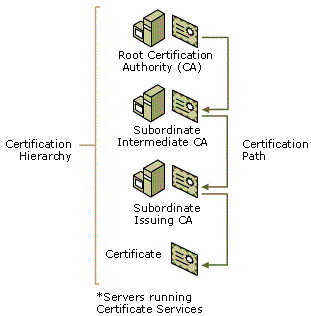
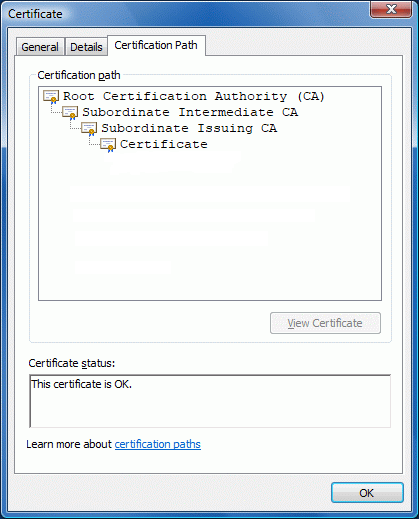
Large organizations might have multiple CAs, set up in a hierarchy that leads to a root CA. Thus, an employee of an organization might have a multitude of certificates in their certificate store that a variety of internal CAs have issued, all of whom share a trust connection via the certification path to the root CA.
The root CA certificate is installed according to the procedure described in CA Certificate. When a device cannot find a trusted issuer for a certificate, the certificate and the entire chain from the intermediate certificate down to the final cerficate can’t be trusted.
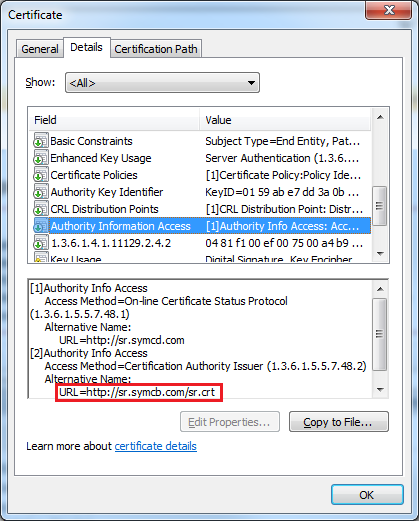
Authority Information Access field:
The Authority Information Access (AIA) field includes a URL that points to a web server that contains a copy of the issuing CA’s certificate (the CA’s public key). To build a certification path, the application reads the authority information access field of issued certificates. If the field does not include the location of the CA certificate, then certificate validation cannot be completed and the application might fail.
|