Turret


Turret |
|
| IT&Operations > Security > Advanced configuration |
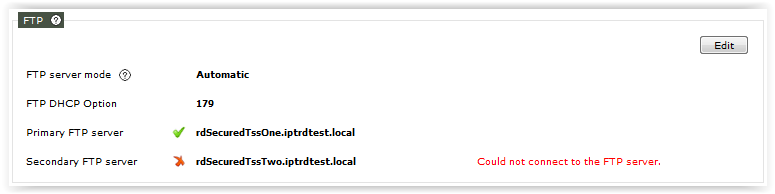
Configure secure connections usage on turrets is made through the Web Admin / Web Wizard FTPSFTP server setup is made through Installation wizard. FTPS usage requires to reference the FTP server with a domain name instead of an IP Address. Web Administration console as well as Web Wizard allow to do so. If device network configuration relies on DHCP and a DHCP option has been setup to provide FTP server domain name, FTP setup can be done by selecting the proper option.
HTTPSAs mentioned in Advanced configuration topic, enabling "Use HTTPS for communications" makes turrets to access TSS though HTTPS instead of non secure HTTP.
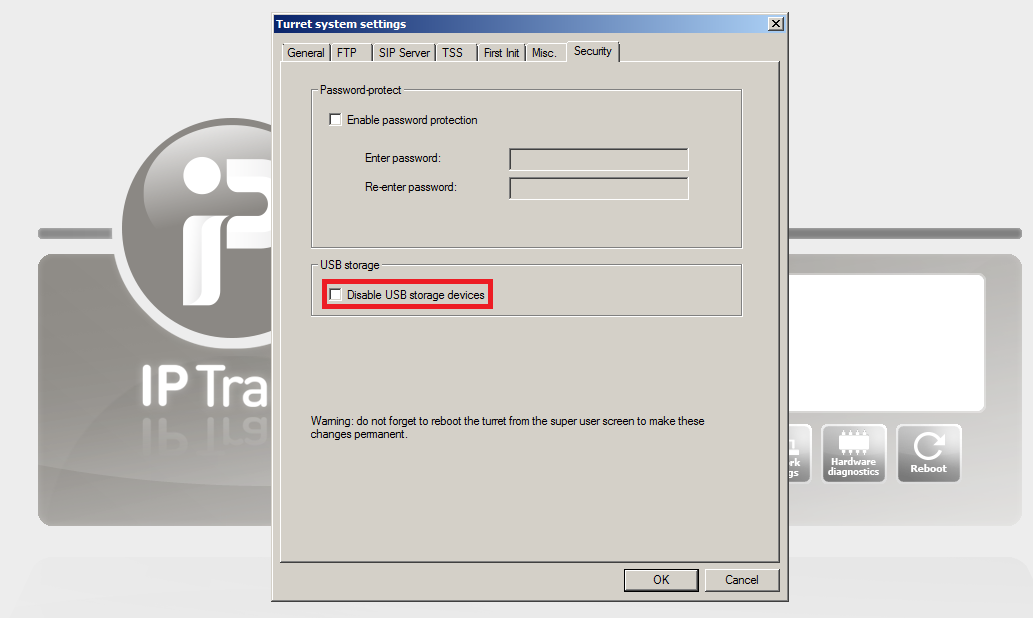
Prevent USB port usageFrom a security point of view, USB mass storage devices (such as USB memory stick or external USB hard drive) represent a thread. Turrets can be configured to disable such devices . To do so, start the device in Super User Mode, click on "Turret Settings" and, under Security tab, check the "Disable USB storages devices" option. Once done, click the reboot button on the Super User Mode screen to validate the configuration.
TLS communicationThis security feature allows Turret to establish TLS communication. Configure following settings in TSS management console, Turret Boot Settings or in the Cluster.
•Enable SIPS application.protocol.sips.enable = true
•Enable SRTP profile.setting.protocol.srtp.enable = true
Additional configuration: •TLS connection port application.sip.tlsconnection.port=5061
|
||||||||||||||||||||||||||||||||||||||||||