Recorder object on TSS


Recorder object on TSS |
|
| Voice Recording > Recorders Configuration > Verint 15.2 > Configuration |
Create a new Recording ServerTo allow devices to communicate with a recorder, a recording server object must be configured through the TSS Console. Then it can be linked to a zone, user profile, shared profile, Turret, TPO and/or TPO Clusters. In order to configure a recording server, navigate to Device Management > Recording Servers. The list of recording servers is displayed, where you can either add a new one or edit an existed one.
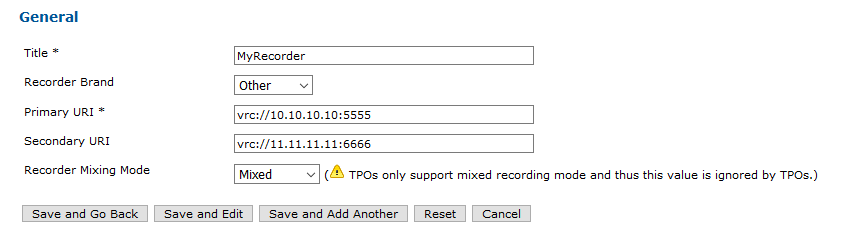
Press the Add new button to create a new recorder. The form to create a new recorder is displayed.
Once the recorder is created, you have to link it to the desired entities. There are two ways to do it: using the edition forms of the desired entities or by using the Links tab of the recording server edition form. Link entities to a recording serverUsing recording server edition formThe recording server edition form can also be used to have a general view of which entities are directly linked to a recorder. It is available under Device Management > Recording Servers, clicking on the desired recording server and selecting the Links tab.
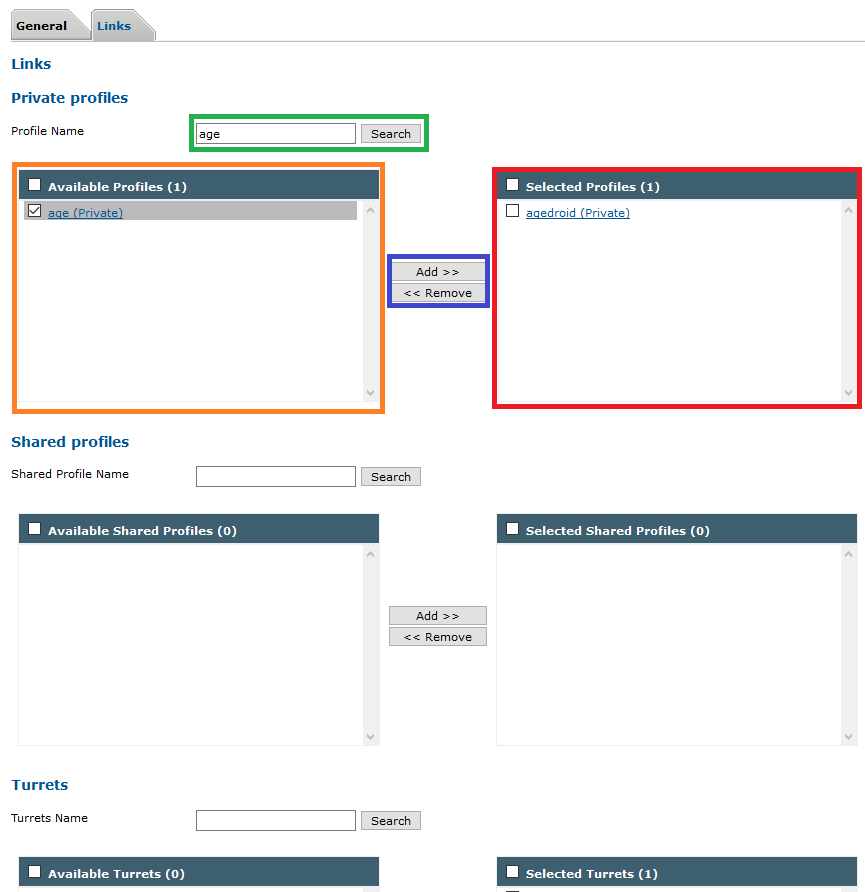
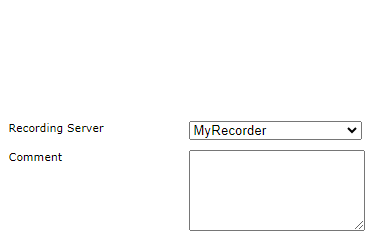
The linked entities form is displayed. You can see which entities are linked to the recorder using the right area. You can use the search form to research an entity that you want link to the recorder. The search results are displayed in the left area. You can either drag-and-drop entities between the two columns or use the control button to add or remove items. Once you have finished the edition, update the item using the bottom left buttons. Using entity edition formIn the turrets, TPOs, TPO Clusters, zones, users and shared profiles edition forms, you can link recording server to the entity, disable recording server or set it to inherited. In all these forms the following selection list is present:
|