Creating a scheduled recurrent job to import shortcut


Creating a scheduled recurrent job to import shortcut |
|
| IT&Operations > Job Policies > Automatic shortcuts import |
This scenario illustrates how to setup a recurrent job policy for importing shortcuts into a particular shared profile.
The description above assumes the following system configuration: ·Shared Profile “MySharedProfile” exists. ·Directory “Shortcuts” in FTP folder must have Write permissions for IIS user (see TSS installation).
1.From menu entry System>Job Policies, press Add new. 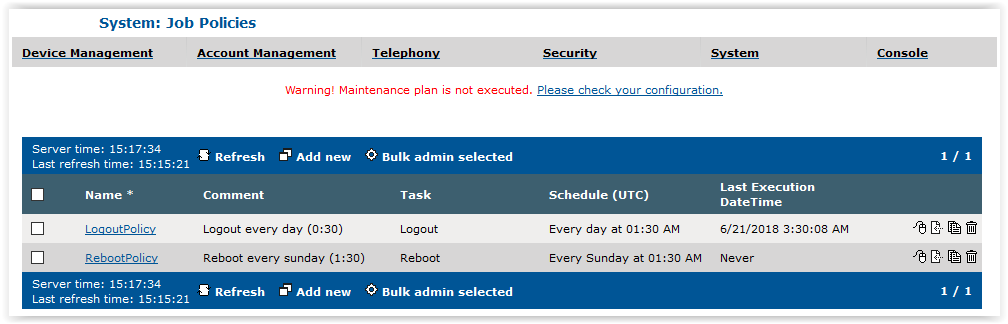
2.Fill formular: a.Fill Name, b.Select Task Trigger shortcut import, c.Select Yes to Task scheduled option, d.Set appropriate period for the import (i.e.: periodical import every sunday at 10.00 pm), e.Select Shared Profile "MySharedProfile", f.Select Merge option and Label Mapping option, g.According to Label Mapping option, add a Label Mapping to map extensions without labels or to overwrite labels (i.e.: overwrite labels where label id 1 to 3 with labels "Mobile", "Work" and "Home"), h.Optionally, enter a Prefix Filename 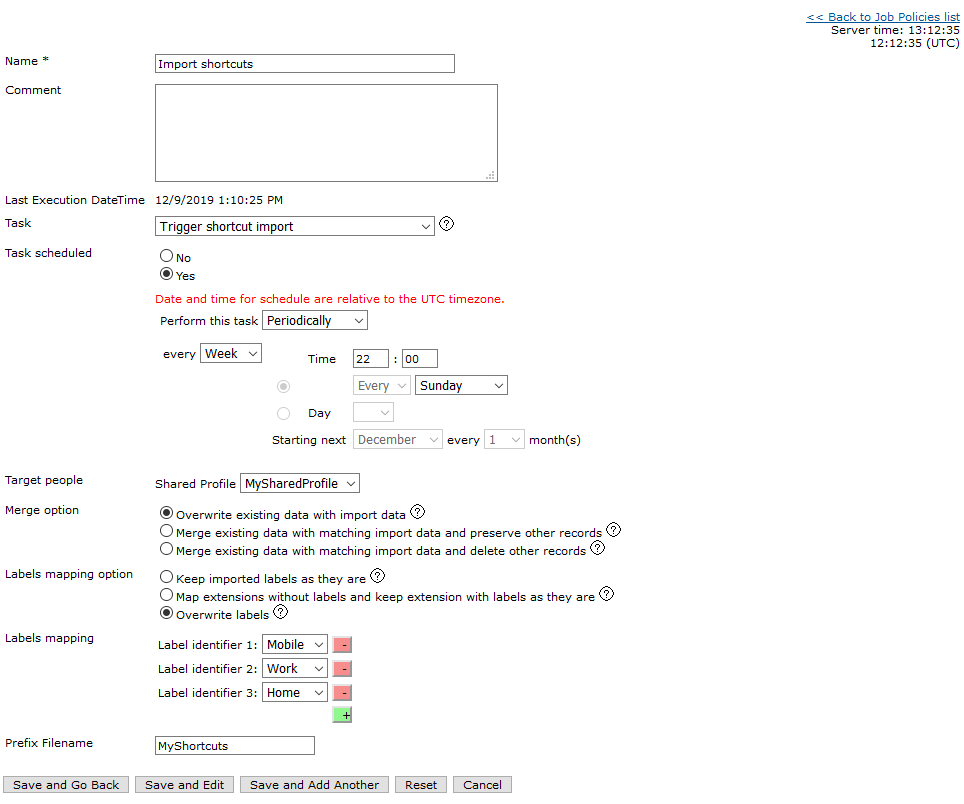
3.Press Save and Go Back
|