Assigning a firmware to all devices


Assigning a firmware to all devices |
|
| Solution Installation > Turret/Console Installation > Device standard Installation > Device Installation |
Now that the new firmware version has been uploaded and is available on the TSS, it can be assigned and installed on turret devices.
This firmware version assignment can be performed at different levels, allowing a precise management of turret devices:
1.To all devices by default: the default version that a device not following any of the rules below will adopt; 2.To the devices belonging to a specific zone: this allows assigning different versions to groups of devices; 3.To a specific device: assigning a version to only one device allows testing a new version (before applying it to all production devices for example). This rule has precedence over the two rules above.
This section describes the first case. See the following sections for cases 2 and 3.
Assigning a firmware to all devices
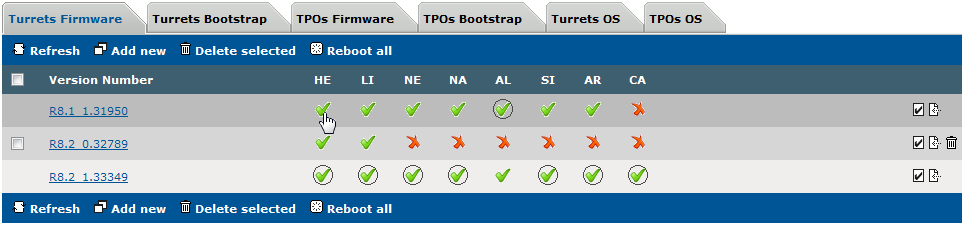
Default version in the list is displayed with a green icon with a circle. To assign default version for a model, place your cursor over green icon (without circle) and clock on it. The icon has now a circle indicating the version is selected as default for this model.
Different firmware versions can be globally assigned to each turret type, as long as the firmware type is available in the version.
|