Uploading device firmware on TSS


Uploading device firmware on TSS |
|
| Solution Installation > Turret/Console Installation > Device standard Installation > Device Installation |
In order to be available for turret devices, a turret firmware must be uploaded on the TSS Administration Console.
Available turret firmwares list
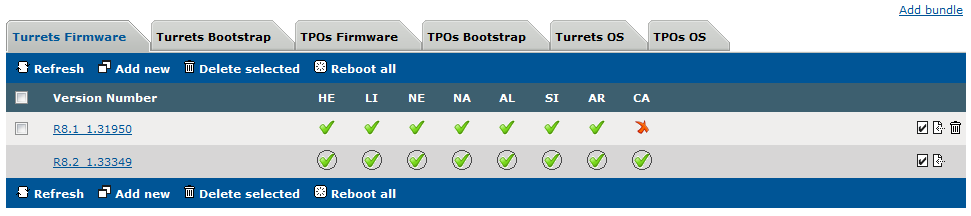
Click on System > Firmware management menu. The list shows the available turret firmwares, as shown below:
For each version, the list shows: •If the version is available for the different types of devices: HE, LI, NE, NA, AL, SI and AR. A green mark indicates that the firmware version is available for that type, while a red mark indicates that it is missing. •If the version is selected as the default version for each device type. This is indicated by a circle. See Assigning a firmware to all devices fore more info.
Upload a new firmware
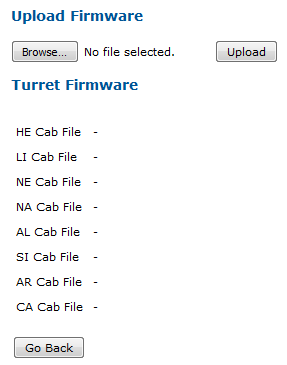
In the TSS console, from System > Firmware management menu, press on Add new button.
Browse you file system in order to upload the different device firmware packages.
At least one firmware must be uploaded. Then press Cancel button.
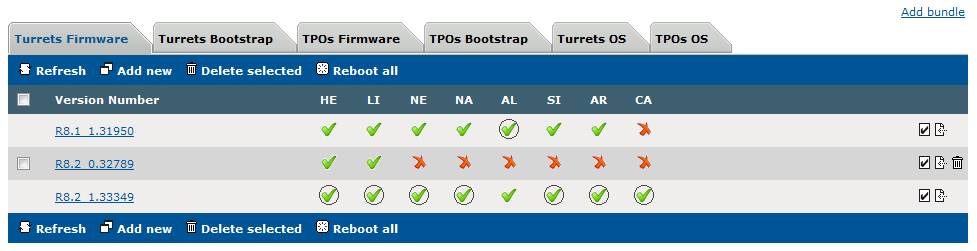
Back to the firmwares list, The new version now appears and shows that HE, LI and NE firmwares have been uploaded for this version.
The Turret firmware can also be deployed with package bundles. See Package deployment with Package Bundles. |