Assign an Operating System upgrade to all turrets


Assign an Operating System upgrade to all turrets |
|
| Solution Installation > Turret/Console Installation > Upgrade OS Image > Windows OS patching |
Now that the new turrets Operating System Upgrades have been uploaded and are available on the TSS, they can be assigned and applied on turrets.
Operating System upgrades assignment can be performed at different levels, allowing a precise management of turrets:
1.To all turrets by default: the default version that a turret not following any of the rules below will adopt; 2.To the turrets belonging to a specific zone: this allows assigning different upgrades to groups of turrets;
This section describes the first case. See the following sections for case 2.
Assigning an Operating System upgrade to all turrets
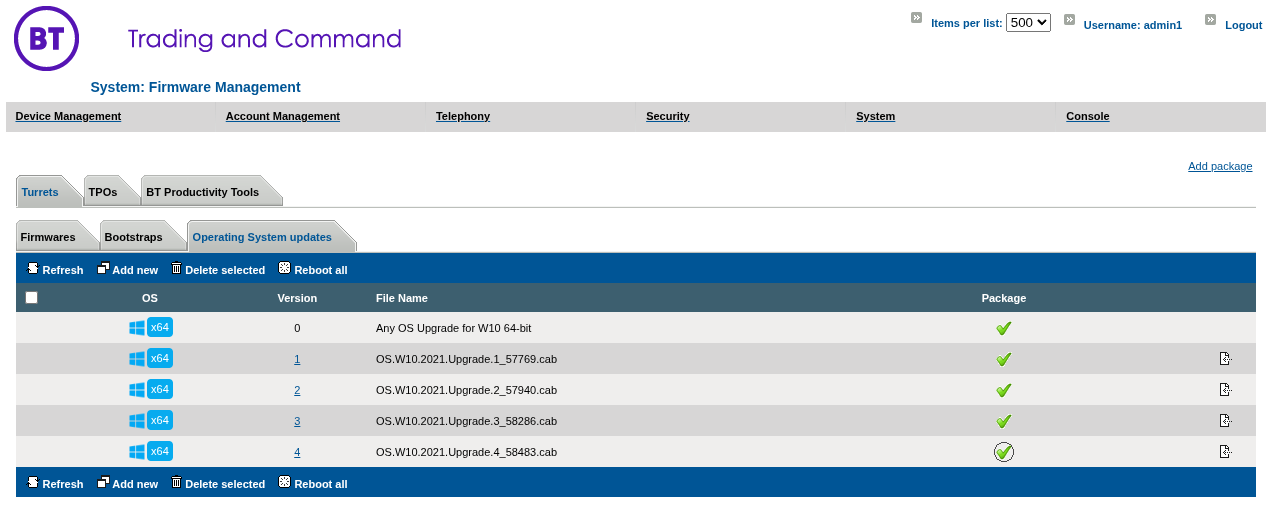
Select the Check Mark next to the version you want applied to turrets.
The Image below shows the 4th turret Operating System upgrade version selected by default.
Please note that a turret reboot is required, to apply the selected Operating System Upgrade. From now on, any turret (that has no specific version specified in its zone) will apply this upgrade version at the next reboot.
Please note that Operating System upgrades are applied sequentially by increasing order. For example: If the turret has been updated to Operating System upgrade version 1 and the latest available is version 3, the upgrade 2 will be applied before applying upgrade 3. |