1.The video call settings are located on the TSS.
2.Go to User's/Shared Profile settings and click on the Video Call panel.
| Location: Terminal Profile Settings |
 |
|
|
| Location: Terminal Boot Settings, Terminal Profile Settings |
|
|
|
| Location: Terminal Boot Settings, Terminal Profile Settings |
|
|
|
| Location: Terminal Boot Settings, Terminal Profile Settings |
|
|
|
| Location: Terminal Boot Settings, Terminal Profile Settings |
|
|
|
| Location: Terminal Profile Settings, Terminal Profile Settings |
 |
|
|
| Location: Terminal Profile Settings, Terminal Profile Settings |
|
|
|
| Location: Terminal Profile Settings, Terminal Profile Settings |
|
|
|
| Location: Terminal Boot Settings, Terminal Profile Settings |
|
|
|
| Location: Terminal Boot Settings, Terminal Profile Settings |
|
|
|
| Location: Terminal Boot Settings, Terminal Profile Settings |
|
|
|
| Location: Terminal Boot Settings, Terminal Profile Settings |
|
|
|
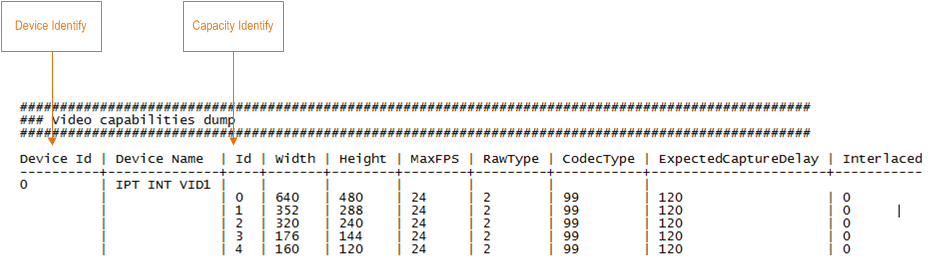
Note: video device identify and video capacity identify information can be found in the debug information of the turret in section Video capabilities dump.
Example of the build-in webcam of the turret
| Location: Terminal Boot Settings, Terminal Profile Settings |
|
|
|
| Location: Terminal Boot Settings, Terminal Profile Settings |
|
|
|
| Location: Terminal Boot Settings, Terminal Profile Settings |
|
|
|
|


