Cisco Unified CM IM and Presence


Cisco Unified CM IM and Presence |
|
| Enterprise Telephony > PBX dependent features > Presence > Presence Cisco > Configure |
General considerations
It’s the system administrator responsibility to properly configure third party components in order to make them responsive to IP Trade device requests. Planning for Cisco Unified Presence Integration with Microsoft Exchange contains detailed information about configuring the different third party components to make them works together properly.
Unified Presence Integration is based on the following components version. •CUCM 9.1.2.10000-28 •Cisco Unified CM IM and Presence: 9.1.1.31900-1 •Windows Server 2008 R2 Standard - Active Directory •Microsoft Exchange Server 2010 (Version: 14.01.0218.013)
IP Trade devices are not supposed to interact with lower versions.
Provide Cisco Unified Presence Server address in IP Trade device configuration
•In TSS Administration console, go to System / Models / Settings •Click "Shortcut Notification" group •Click "Expert" setting level •Search for "Presence server", check corresponding box and type Cisco Unified Presence server connection information in •Click "Update" button in order to validate changes
Configure Speed Dial key to make them subscribe to CUP server
By default, all presence subscriptions are sent to the active PBX Proxy. A particular syntax in speed dial key extension field is used to signify subscription must be sent "Presence server" instead of being sent to the active PBX Proxy.
Subscriptions to CUP server usually references contact SAM-Account-Name but contact e-mail address is supported as well. Syntax to provide a SAM-Account-Name or e-mail address for presence subscription in a Speed Dial key are:
[CUP[samAccount]] [CUP[email@firm.com]]
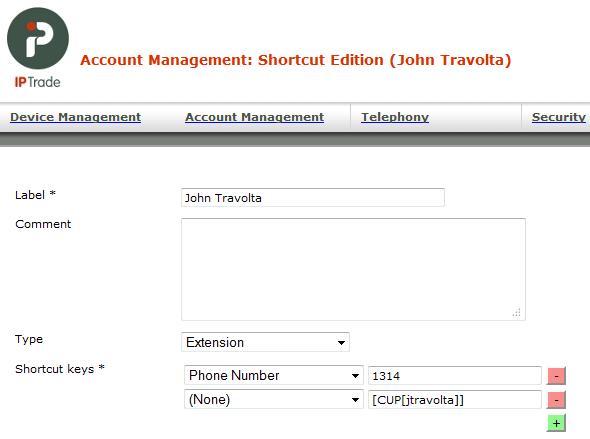
For instance, if John Travolta sam account name is "jtravolta" and his phone extension is "1314", the following configuration allow to display John Travolta presence status and call him by pressing the Speed Dial key.
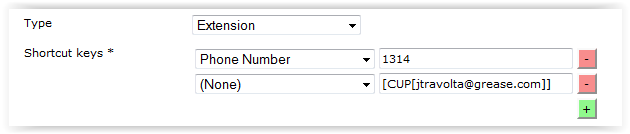
E-mail address is supported into CUP tag as well:
Important notes:
•When a Speed dial key has presence activated but doesn't have any "CUP" extension, presence subscription is sent to the PBX proxy and references Speed Dial extension. •When a Speed dial key has presence activated and has more than one "CUP" extension, presence subscription is sent to the configured "Presence Server" and references one of the CUP extensions arbitrary selected out of the "CUP" extensions list associated to the Speed Dial key. |
||||||||||