Usage


Usage |
|
| Enterprise Telephony > Common > DTMF |
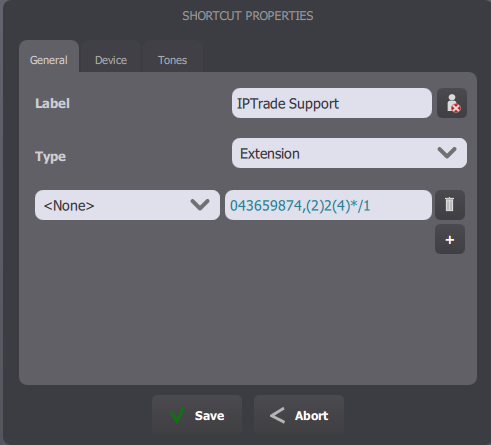
The feature is available through the use of Extension / Contact call key types . Obviously, DTMF can also be sent manually from the Dialpad once a call is established. Both IT administrators and trading platform / console users can now add a DTMF sequence to a call key's extension.
In the above example: •The phone extension 043659874 defines the phone number to dial when pressing the call key; •The string (2)2(4)*/1 given after the comma sign defines the DTMF sequence to be automatically sent once the call is established. A DTMF digit is given as it is ( 0, 1, 2, 3, 4, 5, 6, 7, 8, 9, *, # ). A pause is indicated by either one or more slashes characters ( / ), or a number between parentheses. In the example, the DTMF sequence thus instructs the system to: 1.Once the call is established, wait for two times the pause duration; 2.Send the 2 digit; 3.Wait for four times the pause duration; 4.Send the * digit; 5.Wait for one time the pause duration; 6.Send the 1 digit. The pause duration length is configurable. See Configure. When entering a DTMF sequence in a call key, the IT administrator or user is free to insert whitespaces; they are automatically removed when placing the call. It is also allowed to provide a DTMF sequence for any of the multiple extensions defined in a call key. The Alternate Numbers applet is then useful to choose which number to dial, and thus which DTMF sequence to generate.
|