Configure


Configure |
|
| Trading and C&C > Turret Proxy To Open communication (TPO) > DDI Sharing > DDI Timeout Forwarding |
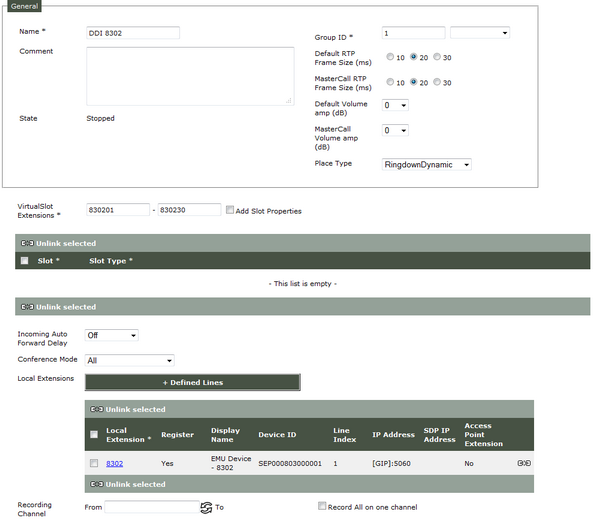
To configure a delay and an extension to automatically forward calls on a DDI line, follow next instructions : 1)Open your preferred Internet navigator, connect to the TSS administration console URL and log onto the system with administrator privileges ; 2)From the main menu, select Device Management | TPO Clusters ; 3)From the list, edit the profile linked to the TPO ; 4)Select the tab panel TPO Places and press Open edition form corresponding to TPO place to configure (this place must be stopped) ; the TPO place edition form is displayed ;
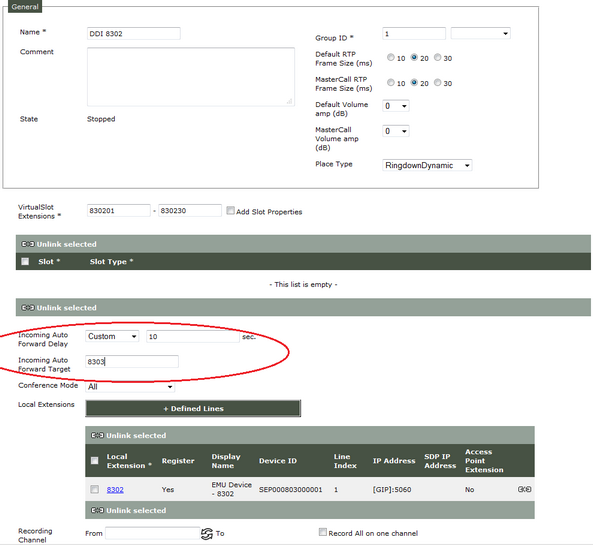
5)By default, Incoming Auto Forward Delay is set to Off (No auto forward will be done). Set it to •Immediate (call is auto forward immediately) and set Incoming Auto Forward Target to extension where call will be forward ; •Custom with a delay in seconds (call will be forwarded x seconds after if call is not answered before) and set Incoming Auto Forward Target to extension where call will be forward ; Remarks : Incoming Auto Forward Delay must be set to immediate or custom and Incoming Auto Forward Target must be filled (not empty or blank characters) to automatically forward calls !
6)Press Update and Go Back button and start place. |