Gecko Configuration


Gecko Configuration |
|
| Solution Installation > TradeSense Installation > Using the TradeSense in Azure |
Gecko Web Authentication
The Gecko webpage requires login credentials and can be accessed at "<tradesenseurl>/gecko/login"
To mange gecko authentication, username and password(encrypted format) should be configured as ADMIN_CREDS environment variable in gecko deployment yaml file.
The login credentials are placed in the environment variable ADMIN_CREDS, in the following format: name: ADMIN_CREDS value: <username>: <sha256_encrypted_password>
Below are steps to add/update login credentials in gecko deployment file. 1. Find ADMIN_CREDS environment variable in gecko deployment file. 2. If environment variable not present in file, then add new variable with key ADMIN_CREDS and value should be combination of username and password(encrypted format) like "<username>:<sha256_encrypted_password>". 3. If environment variable present in file, then you can update username/password, if required.
Example: Update the username to “testuser” and the password to “password123” in gecko deployment file. 1. Generate the SHA-256 hash of "password123", which is ef92b778bafe771e89245b89ecbc08a44a4e166c06659911881f383d4473e94f. 2. Now update ADMIN_CREDS environment variable in gecko deployment file like ADMIN_CREDS: testuser:ef92b778bafe771e89245b89ecbc08a44a4e166c06659911881f383d4473e94f
Gecko Cache UpdateIn Kubernetes gecko cache updates every 3 minutesGecko CRM AuthenticationBelow are the details on authentication implementation design approach for the gecko/raw-events API and how it can be accessed by turret through authentication.
1.An Authorization header is required to make a POST request to gecko/api/raw-events in the following format:
2.To obtain this bearer token: •Make a POST request to the gecko/devices/register endpoint. •Include an Authorization header in this request in the format:
Example Response: When the POST request is successful, the response will include a token and its expiration details. Below is a sample response:
•The token needs to be sent in the Authorization header when accessing the /raw-events API. •The expiryAt field specifies the expiration time of the token in UTC. By default, the token is set to expire every 24 hours.
3.To maintain uninterrupted access to the /raw-events API: •The turret must renew the token before its expiryAt time. •The renewal process involves repeating the token generation steps as mentioned above.
Websocket Authentication in Gecko
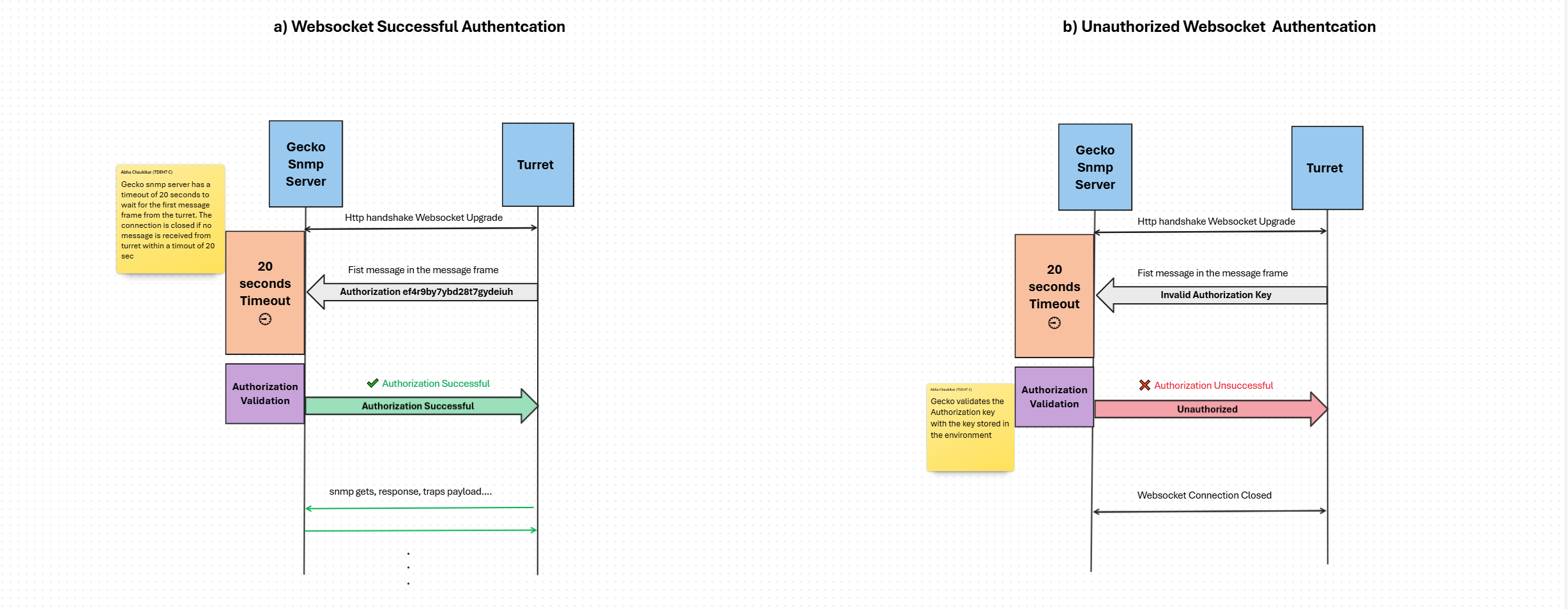
•When the turret establishes a WebSocket connection with the Gecko SNMP server, it must send an authorization key as the first message in the WebSocket message frame in the String format as: "Authorization <key>". The gecko snmp server will wait for 20 seconds for the first message from turret, post which the connection shall be closed if no message is received.
•Upon receiving the key, the Gecko SNMP server validates it:
If the key is valid: The connection is authorized. The snmp server will respond to the turret with the confirmation message “Authorization Successful”. And the subsequent message exchange between the turret and the Gecko SNMP server is then allowed.
If the key is invalid: The Gecko SNMP server will immediately close the connection. A close frame will be sent to the turret containing the message “Unauthorized” with status code 1008. Turret must appropriately handle this scenario.
•The Authorization Key needs to be passed in the following format: <username>:<password>. •The turret must pass the same username and password credentials which is configured in gecko in order to successfully validate the authentication. The username and password credentials are the shared keys between gecko and turret and hence must not be changed. |