Add an Intercom Line


Add an Intercom Line |
|
| Attendant Features > Direct Intercom Over Cisco intercom lines > Configure |
Create an Intercom Line
The talker and the listener must have an Intercom line
1)Open your preferred Internet navigator, connect to the CISCO Unified Administration console URL and log onto the system with administrator privileges ;
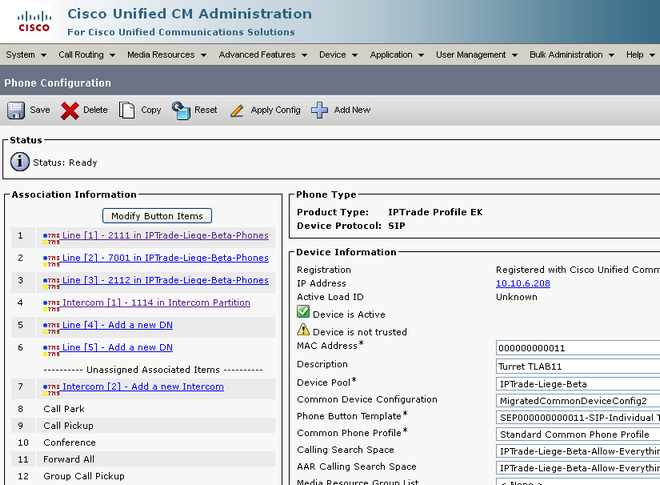
2)From the main menu, select Device / Phone screen ; in the result list, locate the entry matching the attendant console device and open the Phone Configuration form ;
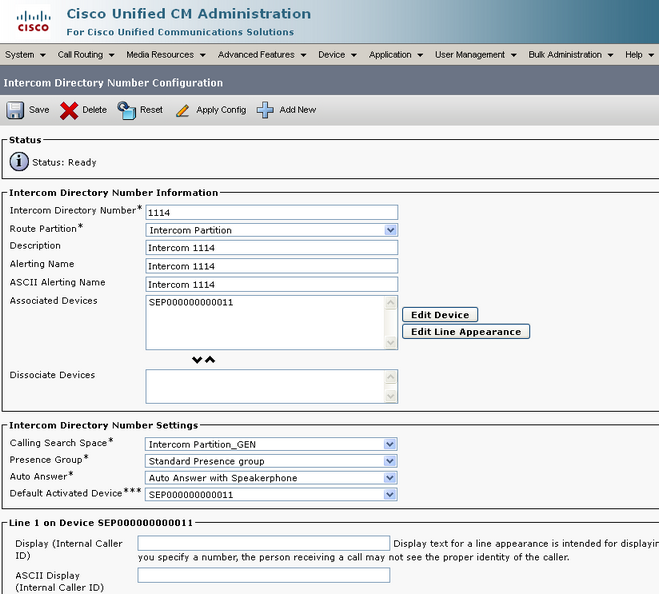
3)Click on an Intercom [x] - Add a new Intercom link where x is a number and fill settings
a)Intercom Directory Number field is the number of line defined as intercom line ; b)Route Partition must be set with Intercom Partition choice ; c)Calling Search Space must be set with Intercom Partition_GEN ;
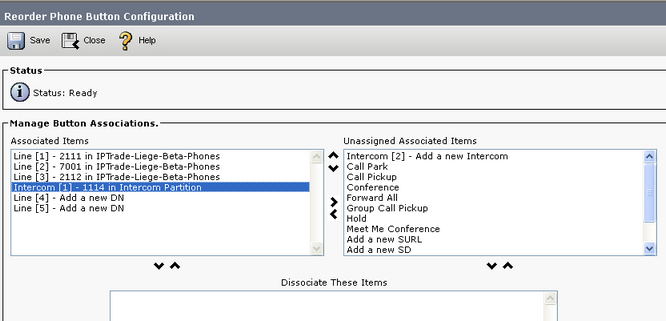
4)If the Intercom [x] - Y in Intercom Partition link (where x is a number and Y is the Intercom Directory Number previously defined) is in the Unassigned Associated Items list, please do as following otherwise, your intercom line is configured ;
5)From the Association Information pick list, press Modify Button Items button ; the dialog box Reorder Phone Button Configuration is displayed ;
6)From the Reorder Phone Button Configuration dialog box, select the Intercom [x] – Y in Intercom Partition entry in the Unassigned Associated Items list, move it to the Associated Items list and apply the changes
|