Compose a New message or reply to an existing one


Compose a New message or reply to an existing one |
|
| Solution Integration > Text messaging > Usage |
Composing a new outbound message is performed by either: 1.Pressing the New button at any time; 2.Or pressing the Reply button when in message reading mode, to reply to that message.
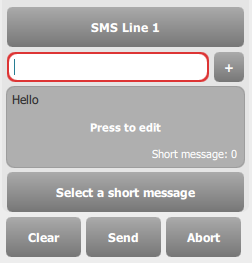
The applet switches to write mode. The line field allows the operator to select which line to use for sending the message. When replying to a message, the line is automatically set to the line of the original message. The extension field is used to enter the destination's phone extension. When replying to a message, this field is filled automatically with the phone extension (possibly matching one of the operator's call keys) of the original message's originator.
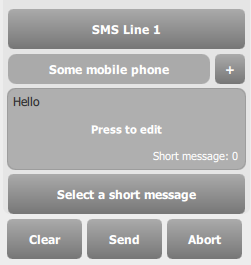
The operator can also populate the extension field with the press of a single button. When the field has focus (a state that is symbolized by the red outline), a press on a call key (coming from TSS or corporate directory) automatically puts the primary extension of that call key in the extension field, and gives focus to the message body field. (note that when the extension field has focus, the operator is still able to perform an instant search in his contacts database; the virtual keyboard is linked to the instant search when this one is activated) The extension field can also be populated with a specific alternate extension of a call key, from the Alternate Numbers applet.
Enter the message body in the message field, and press the Send button.
The newly submitted message appears at the top of the message list, with a left-oriented orange arrow. See the next section for message delivery status monitoring.
|