Check Delivery status of a message


Check Delivery status of a message |
|
| Solution Integration > Text messaging > Usage |
When submitting a new outbound message, the system marks it as outbound not delivered yet (a left-oriented orange arrow with white dots in it). The system then starts querying the SMS gateway periodically to check its delivery status. When a delivery status is received for that message, the corresponding arrow turns either green or red, depending on the success of its delivery to the destination. The system then stops querying the SMS gateway for that message.
When a message has been sent to multiple recipients at once, the delivery status in the message list reflects the global delivery status of each individual message, i.e. an orange arrow indicates that some messages are still to be delivered, a green arrow indicates that each message has been successfully delivered, and a red arrow indicates that at least one message could not be delivered.
To get the delivery status of each message, the operator can press on the recipient and time information line when in reading mode.
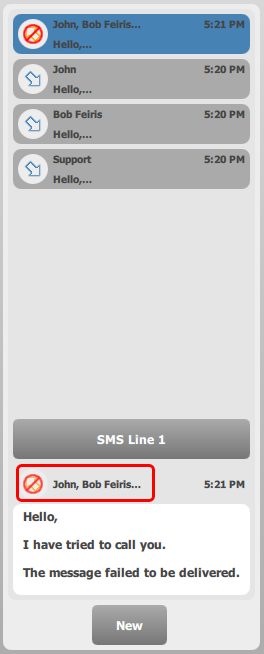
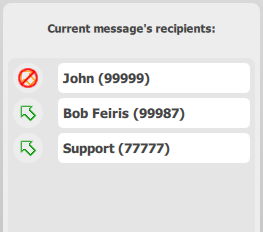
The applet switches to recipient list mode, and displays each delivery status next to each recipient of the message. Here, we can see that the message has been successfully sent to Bob Feiris, and Support but is failed for the other recipient (John).
Note: If the message could not be delivered to any of the message's recipients, the operator will not be able to see the exact cause of the delivery failure. To have more information on what has gone wrong, looking at the system traces will be necessary.
|


