PBX Line configuration


PBX Line configuration |
|
| Solution Integration > PBXs > Common PBX configuration |
A PBX Line needs to be linked to a PBX Cluster. This section explains how to link a PBX cluster to a line.
PBX lines can be configured in : •User Profiles : (Account management -> Users -> Your user -> Lines) •Shared Profiles : (Account management -> Shared Profiles -> Your shared profile -> Lines) •Turret devices : (Device Management -> Turrets -> Your turret -> Lines) •TPO Clusters : (Device Management -> TPO Clusters -> Your cluster -> TPO Lines)
If the PBX type is CUCM, lines can be fetched directly from the PBX which simplifies the configuration. See the "Fetch Lines" topic. Line configurationGo to the "Lines" edition page of your : User Profile / Shared Profile / Turret Device / TPO Cluster.
The configuration explained in this topic is only related to the "SIP" part of the form in : User Profile / Shared Profile / Turret Device. (All the form of TPO Line configuration is related to SIP settings).
Click on the "Add new" button to open the line creation form. Example of the line creation form in : User Profile / Shared Profile / Turret Device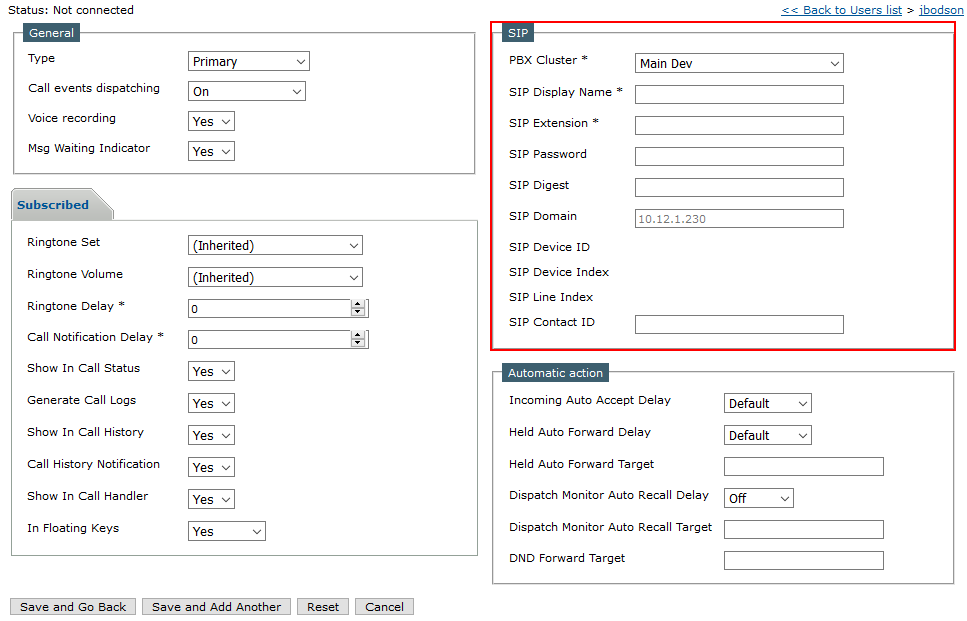 User Profile / Shared Profile / Turret Device creation form Example of the line creation form for TPO lines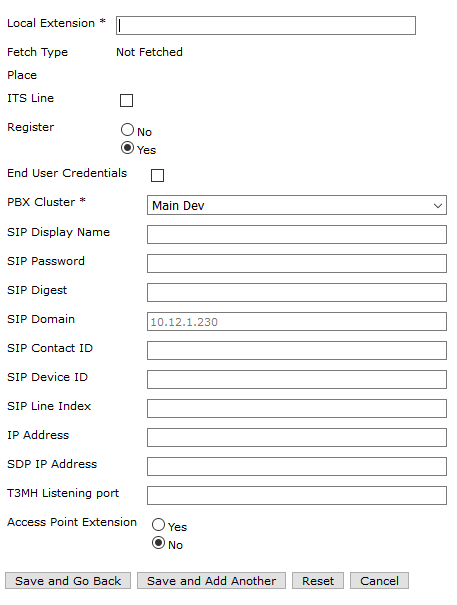 TPO Line creation form Important fieldsHere is a list of important fields.
•PBX Cluster : When a PBX Cluster is selected, the SIP domain is automatically set to the same value as the SIP domain contained in the PBX Cluster. •SIP display name : The display name of the line. •SIP Extension : The extension of the line. •SIP Password : The password used to register the line. •SIP Digest : The digest used to register the line. •SIP domain : Automatically filled with the SIP domain of the PBX Cluster . •SIP Contact ID : The endpoint contact ID.
When you are done configuring the line, click on the "Save and Go back" button. |