AudioCodes SBC as a PBX


AudioCodes SBC as a PBX |
|
| Solution Integration > Session Border Controllers |
OverviewThe BTTrade platform needs a PBX to register to so that it can provide an interface to DDI lines both internal customer extensions and the PSTN. This design allows the customer to have a single enterprise voice platform that the turrets then integrate with rather than having a separate turret voice platform. In recent times the rise of Microsoft Teams has meant that the customers are starting to decommission their PBX and so the BTTrade platform needs to replace the PBX function with a component in its architecture. The BTTrade platform already uses an SBC to interface with Private Wires, the SBC can be used to emulate a PBX and to allow the BTTrade platform to register DDI extns as it would do to a PBX.This is intended as a guide to configuring the SBC as a PBX to allow TPO to register DDI extensions. In addition, configuration of a SIP trunk to PSTN or to legacy PBX will be included to allow inclusion of example route patterns that may be needed. This document will not cover connection of any specific PSTN carrier.It is assumed that the reader is familiar with setting up the Audio Codes SBC to interface to Private Wires and the start point for this document assumes that the SBC is already deployed and set up to a Private Wire Carrier.
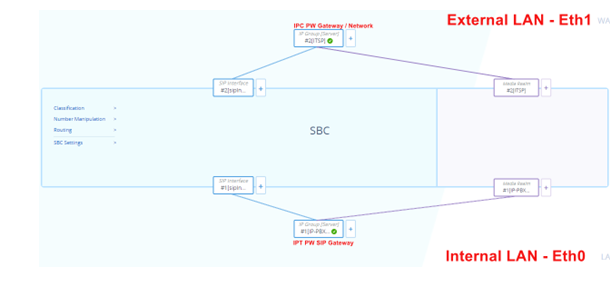
This is a typical Topology View BEFORE we add components for SBC as a PBX for details on PW set up please see AudioCodes SBC install
|