Common section


Common section |
|
| User Options > Peripheral devices > Wireless Push To Talk > Configuration > Graphical interface |
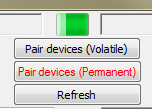
At the top of this section is a green square. This is the WPTT indicator, once the deviced are paired, this square will reflect the PTT state. Once the user presses the PTT button, the square will change to yellow color (when PTT is maintained) and go back to green once the PTT button is released.
The “pair devices (volatile)” can be used to associate a transmitter and a reciever on a volatile basis. It means that if the reciever is plugged off or if the transmitter runs out of battery, the pairing configuration will be lost. The “Pair devices (Permanent)” can be used to associate a transmitter and a reciever in a permanent way. It means that each device will keep its pairing configuration even if they are powered off. |