Alcatel Lucent OXE


Alcatel Lucent OXE |
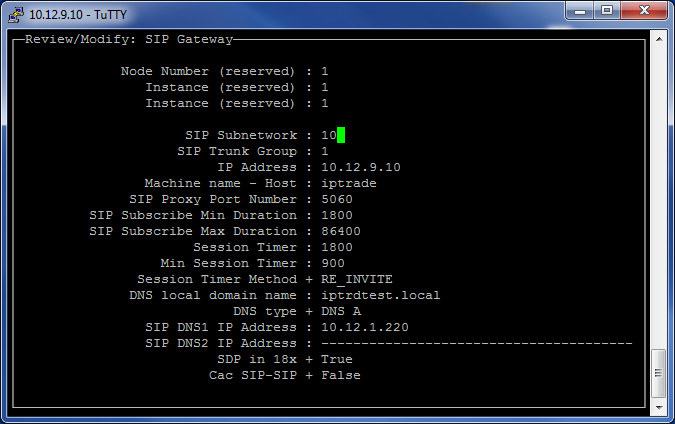
|
| Trading and C&C > Turret Proxy To Open communication (TPO) > TPO Clusters > Hot Backup > DNS mode > Configure > IP-PBX |
Configuration of OXE:
Note: the pressed keys 'Crtl + v' for validate and 'Ctrl + c' to Cancel or Back
1.Log into the management console of Alcatel by using Telnet, then mgr command to display management console.
2.Select SIP object, SIP gateway and change the field “DNS local domain name” and “SIP DNS1 IP address” and Ctrl + v to validate
•The "SIP DNS1 IP address" can be the IP address of the Main DNS server if a delegation zone to the mini DNS server of TPO cluster is defined.
•The "SIP DNS1 IP address" and "SIP DNS2 IP address" can be the IP addresses of the mini DNS servers of TPO cluster.
3.Restart OXE to take account the change: quit management console by typing Ctrl + C … then type “shutdown –r now”
|