TPO Setup


TPO Setup |
|
| Trading and C&C > Turret Proxy To Open communication (TPO) > TPO Clusters > Hot Backup > Session Persistency > Configure |
Here are the steps to configure the redundancy mode to Session Persistency:
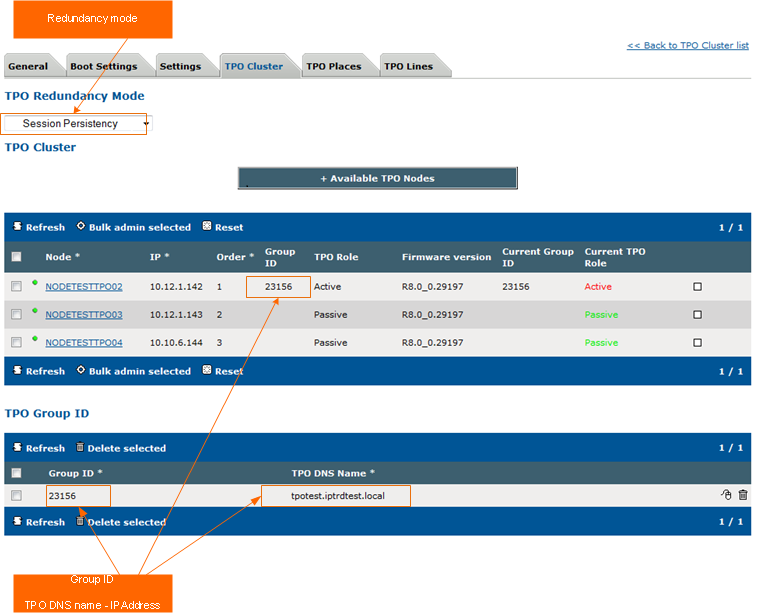
1.Go to TSS Administration console, and click on Device Management
2.Click on TPO Clusters and select the cluster to use
3.Click on the TPO Cluster panel and select Session Persistency
4.Set the TPO DNS name for the Group ID. A Fully Qualified Domain Name (FQDN) must be specified under the form <Host>.<Domain>. The period symbol is used to separate the host and the domain names.
Example: TPO DNS name is TPOtest.iptrdtest.local
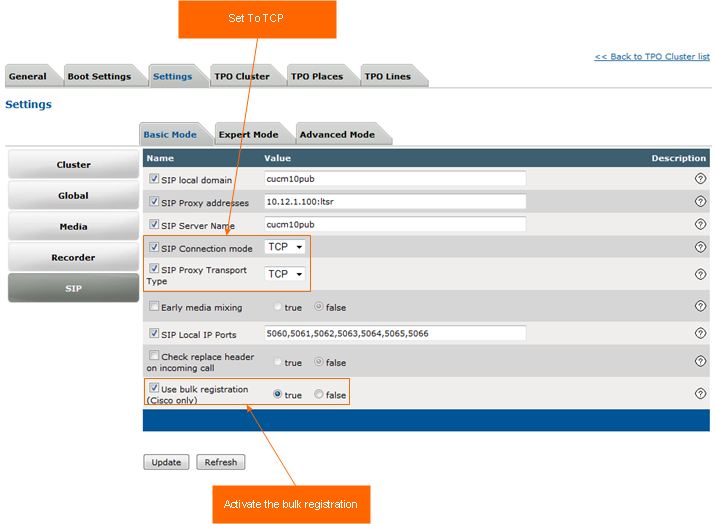
5.Click on the Settings panel and go to SIP panel
6.Set the Proxy Transport and Connection mode to TCP and activate the bulk registration for the Cisco call manager.
7.Click to Update to validate the modifications
|