Related Settings


Related Settings |
|
| Trading and C&C > Turret Proxy To Open communication (TPO) > DDI Sharing > DDI Barge > Configure |
Conference Barge preservation
Setting Preservation of DDI barge call(s) in conference mode is available in following section: •Device Management / TPOs / Edit TPO / Boot Settings / Expert Mode / Global •Device Management / TPO Clusters / Edit TPO Clusters / Boot Settings / Expert Mode / Global •Device Management / Zones / Edit Zone / Boot Settings / Expert Mode / Global
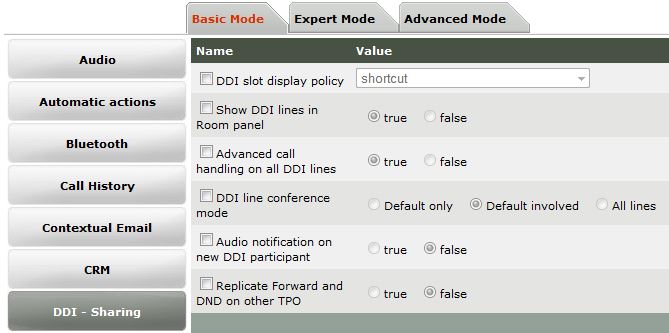
Audio notification on new DDI participant
Setting Audio notification on new DDI participant is available in following section: •Device Management / Turrets / Edit Turret / Turret Boot Settings / Basic Mode / DDI - Sharing •Device Management / Zones / Edit Zone / Turret Boot Settings / Basic Mode / DDI - Sharing •Account Management / Users / Edit User / Settings / Basic Mode / DDI - Sharing •Account Management / Shared Profiles / Edit Shared Profile / Settings / Basic Mode / DDI - Sharing •System / Models / Edit Model / Settings / Basic Mode / DDI - Sharing
Call Browser popup on new DDI barger
Setting Call Browser popup on new DDI barger is available in following section: •Device Management / Turrets / Edit Turret / Turret Boot Settings / Expert Mode / Join - Barge •Device Management / Zones / Edit Zone / Turret Boot Settings / Expert Mode / Join - Barge •Account Management / Users / Edit User / Settings / Expert Mode / Join - Barge •Account Management / Shared Profiles / Edit Shared Profile / Settings / Expert Mode / Join - Barge •System / Models / Edit Model / Settings / Expert Mode / Join - Barge
Connected DDI shortcut action
Setting Connected DDI shortcut action is available in following section: •Device Management / Turrets / Edit Turret / Turret Boot Settings / Expert Mode / Automatic Actions •Device Management / Zones / Edit Zone / Turret Boot Settings / Expert Mode / Automatic Actions •Account Management / Users / Edit User / Settings / Expert Mode / Automatic Actions •Account Management / Shared Profiles / Edit Shared Profile / Settings / Expert Mode / Automatic Actions •System / Models / Edit Model / Settings / Expert Mode / Automatic Actions
Call Browser popup on DDI shortcut
Setting Call Browser popup on DDI shortcut is available in following section: •Device Management / Turrets / Edit Turret / Turret Boot Settings / Expert Mode / Join - Barge •Device Management / Zones / Edit Zone / Turret Boot Settings / Expert Mode / Join - Barge •Account Management / Users / Edit User / Settings / Expert Mode / Join - Barge •Account Management / Shared Profiles / Edit Shared Profile / Settings / Expert Mode / Join - Barge •System / Models / Edit Model / Settings / Expert Mode / Join - Barge
|
||||||||||||||||||||||||||||||||||||||||||||||||||