Related Settings


Related Settings |
|
| Trading and C&C > Barge-in > Configure |
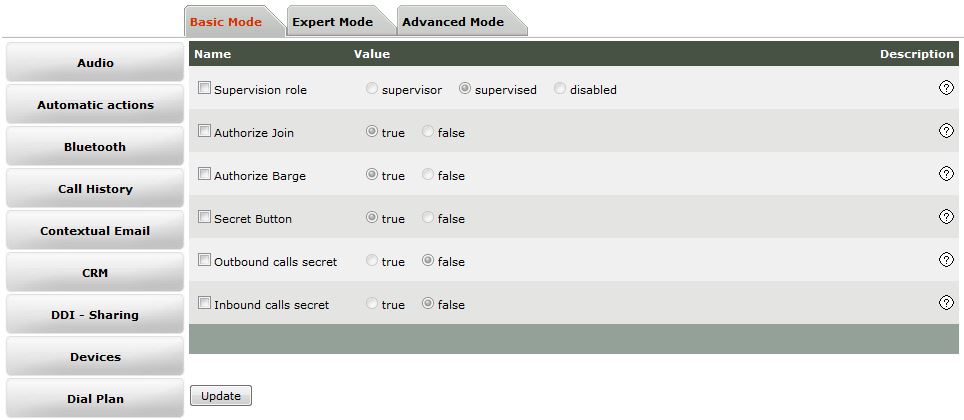
Authorize Barge
Setting Authorize Barge is available in following section: •Device Management / Turrets / Edit Turret / Turret Boot Settings / Basic Mode / Join - Barge •Device Management / Zones / Edit Zone / Turret Boot Settings / Basic Mode / Join - Barge •Account Management / Users / Edit User / Settings / Basic Mode / Join - Barge •Account Management / Shared Profiles / Edit Shared Profile / Settings / Basic Mode / Join - Barge •System / Models / Edit Model / Settings / Basic Mode / Join - Barge
Setting properties:
Disable Barge in
Setting Disable Barge in is available in following section: •Device Management / Turrets / Edit Turret / Turret Boot Settings / Expert Mode / Layout •Device Management / Zones / Edit Zone / Turret Boot Settings / Expert Mode / Layout •Account Management / Users / Edit User / Settings / Expert Mode / Layout •Account Management / Shared Profiles / Edit Shared Profile / Settings / Expert Mode / Layout •System / Models / Edit Model / Settings / Expert Mode / Layout
Setting properties:
Notification on barge in
Setting Notification on barge in is available in following section: •Device Management / Turrets / Edit Turret / Turret Boot Settings / Basic Mode / Audio •Device Management / Zones / Edit Zone / Turret Boot Settings / Basic Mode / Audio •Account Management / Users / Edit User / Settings / Basic Mode / Audio •Account Management / Shared Profiles / Edit Shared Profile / Settings / Basic Mode / Audio •System / Models / Edit Model / Settings / Basic Mode / Audio
Setting properties:
Call Browser popup on barge
Setting Call Browser popup is available in following section: •Device Management / Turrets / Edit Turret / Turret Boot Settings / Expert Mode / Join - Barge •Device Management / Zones / Edit Zone / Turret Boot Settings / Expert Mode / Join - Barge •Account Management / Users / Edit User / Settings / Expert Mode / Join - Barge •Account Management / Shared Profiles / Edit Shared Profile / Settings / Expert Mode / Join - Barge •System / Models / Edit Model / Settings / Expert Mode / Join - Barge
Setting properties:
Call Browser applet location
Setting Call Browser applet location is available in following section: •Account Management / Users / Screen Layout /Handset Configuration
Share incoming
Setting Share incoming is available in following section: •Device Management / Turrets / Edit Turret / Turret Boot Settings / Basic Mode / Shortcut Notification •Device Management / Zones / Edit Zone / Turret Boot Settings / Basic Mode / Shortcut Notification •Account Management / Users / Edit User / Settings / Basic Mode / Shortcut Notification •Account Management / Shared Profiles / Edit Shared Profile / Settings / Basic Mode / Shortcut Notification •System / Models / Edit Model / Settings / Basic Mode / Shortcut Notification
Setting properties:
Show presence groups in Room panel
Setting Show presence groups in Room panel is available in following section: •Device Management / Turrets / Edit Turret / Turret Boot Settings / Basic Mode / User Settings •Device Management / Zones / Edit Zone / Turret Boot Settings / Basic Mode / User Settings •Account Management / Users / Edit User / Settings / Basic Mode / User Settings •Account Management / Shared Profiles / Edit Shared Profile / Settings / Basic Mode / User Settings •System / Models / Edit Model / Settings / Basic Mode / User Settings
Setting properties:
Secret Button
Setting Secret Button is available in following section: •Device Management / Turrets / Edit Turret / Turret Boot Settings / Basic Mode / Join - Barge •Device Management / Zones / Edit Zone / Turret Boot Settings / Basic Mode / Join - Barge •Account Management / Users / Edit User / Settings / Basic Mode / Join - Barge •Account Management / Shared Profiles / Edit Shared Profile / Settings / Basic Mode / Join - Barge •System / Models / Edit Model / Settings / Basic Mode / Join - Barge
Setting properties:
Inbound calls secret
Setting Inbound calls secret is available in following section: •Device Management / Turrets / Edit Turret / Turret Boot Settings / Basic Mode / Join - Barge •Device Management / Zones / Edit Zone / Turret Boot Settings / Basic Mode / Join - Barge •Account Management / Users / Edit User / Settings / Basic Mode / Join - Barge •Account Management / Shared Profiles / Edit Shared Profile / Settings / Basic Mode / Join - Barge •System / Models / Edit Model / Settings / Basic Mode / Join - Barge
Setting properties:
Outbound calls secret
Setting Outbound calls secret is available in following section: •Device Management / Turrets / Edit Turret / Turret Boot Settings / Basic Mode / Join - Barge •Device Management / Zones / Edit Zone / Turret Boot Settings / Basic Mode / Join - Barge •Account Management / Users / Edit User / Settings / Basic Mode / Join - Barge •Account Management / Shared Profiles / Edit Shared Profile / Settings / Basic Mode / Join - Barge •System / Models / Edit Model / Settings / Basic Mode / Join - Barge
Setting properties:
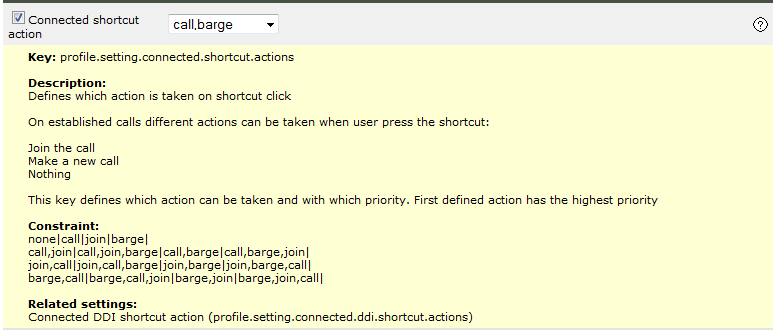
Connected shortcut action
Setting Connected shortcut action is available in following section: •Device Management / Turrets / Edit Turret / Turret Boot Settings / Basic Mode /Automatic Actions •Device Management / Zones / Edit Zone / Turret Boot Settings / Basic Mode / Automatic Actions •Account Management / Users / Edit User / Settings / Basic Mode / Automatic Actions •Account Management / Shared Profiles / Edit Shared Profile / Settings / Basic Mode / Automatic Actions •System / Models / Edit Model / Settings / Basic Mode / Automatic Actions
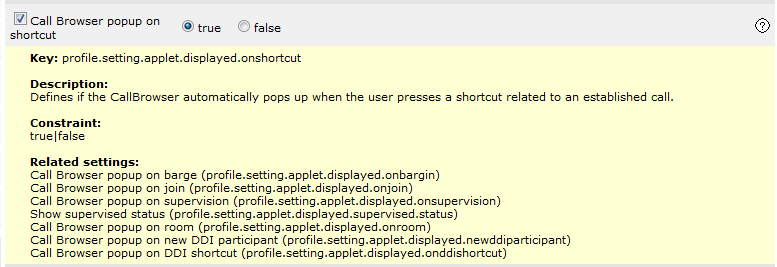
Call Browser popup on shortcut
Setting Call browser popup on shortcut is available in following section: •Device Management / Turrets / Edit Turret / Turret Boot Settings / Expert Mode / Join - Barge •Device Management / Zones / Edit Zone / Turret Boot Settings / Expert Mode / Join - Barge •Account Management / Users / Edit User / Settings / Expert Mode / Join - Barge •Account Management / Shared Profiles / Edit Shared Profile / Settings / Expert Mode / Join - Barge •System / Models / Edit Model / Settings / Basic Mode / Expert Mode / Join - Barge
Maximum number of stream copies
Setting Number of copied streams is available in following section: •Device Management / Turrets / Edit Turret / Turret Boot Settings / Expert Mode / RTP •Device Management / Zones / Edit Zone / Turret Boot Settings / Expert Mode / RTP •System / Models / Edit Model / Settings / Basic Mode / Expert Mode / RTP
Setting properties: •Advanced setting: application.mm.numberofcopy •Description: Define the maximum number of stream copies. The number of stream copies is important for 2 different features: Barge-in and Voice Recording. If the recording system is working with stream copy mechanism, this parameter should be set at least to 1. As far as Barge-In is concerned, this parameter indicates the number of users that can barge-in one particular call simultaneously minus the recording system requirement. •Values: 0 - 5
SIP Barge Authorization
Setting SIP Barge Authorization is available in following section: •Device Management / Turrets / Edit Turret / Turret Boot Settings / Expert Mode / SIP •Device Management / Zones / Edit Zone / Turret Boot Settings / Expert Mode / SIP •System / Models / Edit Model / Settings / Basic Mode / Expert Mode / SIP
Setting properties:
|
||||||||||||||||||||||||||||||||||||||||||||||||||||||||||||||||||||||||||||||||||||||||||||||||||||