Usage


Usage |
|
| Trading and C&C > Netrix > Net Broadcast |
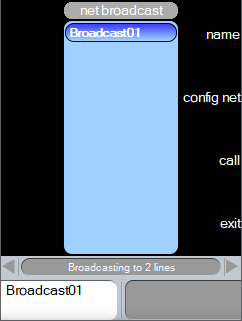
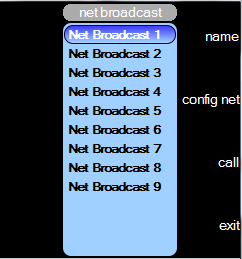
Broadcasting is the ability to make a simultaneous transmission over a group of Private-Wire lines. A broadcast is initiated by pressing the net-broadcast key for the group of lines (the Net) you wish to broadcast to. You then simply speak via your handset across all the lines included in the Net. You can add and remove lines from any Net, to suit your requirements. Your user profile must be configured with net-broadcast keys by your platform administrator. Access to, and configuration of, each net is provided by menus shown in the Netrix application display. Each net must be populated with the appropriate Private-Wire lines. Once completed, to transmit a broadcast you simply press the associated net-broadcast key. The net-broadcast keys can also be programmed on a personal keypage by your platform administrator. Opening the Net Broadcast menuThe Net Broadcast menu displays all nets that you can utilise. Each net is provided with a default name, which can be changed. If no key hits are registered in the Net Broadcast menu and the timeout expires (30 seconds) the menu is closed. press utilities press …to display the Utilities menu secondary page press config net … the Net Broadcast menu is displayed
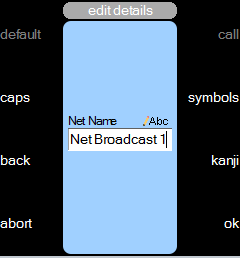
Changing the Net nameEach of the nets is provided with a default name (e.g. Net Broadcast 1). These names can be changed to something more suitable. The name of a net can be up to 32 characters in length. This is truncated to 20 characters when displayed on the Broadcast key. As soon as the net name has been changed the Net Broadcast key on the line bank and in the menu list is automatically updated to reflect the new name. If no keypresses are registered and the timeout expires (30 seconds) the Edit Net Details menu closes and you are returned to the Utilities menu. With the Net Broadcast menu displayed: press name …the edit net details menu is displayed. enter name …in field using your dialpad keys. press ok … to confirm change
caps This is a toggle action key. Alternates between text being entered as capitals, title case, lower case or set to enter numbers. The icon denotes the current status. back Deletes the character to the left of the cursor. abort Returns to the net broadcast menu and abandons any changes made. symbols Displays the symbols menu which allows you to enter a range of common symbols. kanji Allows you to enter Kanji characters, if enabled on your platform. ok Saves any changes made and returns you to the Net Broadcast menu. Adding/Removing lines to a NetWhen you initially open a net it is empty. Nets must be populated with lines to enable you to be able to broadcast simultaneously to all lines in the Net. You can have up to 20 lines in the net (Private Wire lines only). If no key hits are registered in the Net Lines Configure menu and the timeout expires (30 seconds) the menu is closed. With the Net Broadcast menu open: press press config net …menu to configure selected net is displayed press line key …of line to add indicator red-on repeat until all lines added If a key that cannot be in a net is selected, then the indicator will remain red-off. Lines included in the net are displayed in the central view.
Removing lines: press press delete …the line is removed from the net or press line key …of line to remove indicator red-off repeat for any additional lines to remove press ok …when complete. You are returned to the Utilities menu. press abort …changes to the net are cancelled. You are returned to the Utilities menu. You are not restricted to only adding lines on the currently viewed keypage. Use the Broadcasting to a Net via programmed keysOnce nets are populated with lines you can use the broadcast keys to simultaneously transmit to all lines included in the net. press press broadcast key …make your broadcast. Note: if a line in the net has a mic or handset connected (either by you, or another user), it is excluded from the broadcast. No visual indications are provided as to who is receiving the broadcast. Exclude a line from the broadcastIf you wish to exclude a line from the broadcast: press line key …this line will be on your handset press broadcast key …which will auto clear the line on your handset, and make your broadcast without this line in the broadcast. Broadcasting to a Net via menupress utilities press …to display the Utilities menu secondary page press config net … the Net Broadcast menu is displayed
With the Net Broadcast menu open: press press call … make your broadcast Note: If the Net Broadcast preferred handset is already busy on a call, initiating a net broadcast shall hold or clear the current call on the handset. This is dependent on the user’s auto hold settings.
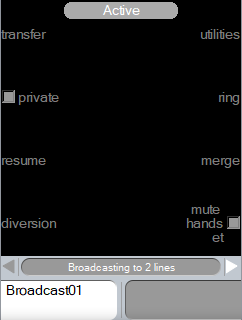
Broadcast Busy IndicationOnce the net broadcast call is established, its status is displayed either of the three ways based on the configuration. 1. None This is the default option; you see the anchor line(s) go busy and any VOL flashes. 2. Status Message When you press the PRESET (or talk) key, a status message is displayed which says, “Broadcasting to {N} lines”. If there are 10 lines in the broadcast net, and •one has been excluded because it is busy, then "Broadcasting to 9 lines" is displayed. •no lines are excluded then "Broadcasting to 10 lines" is displayed.
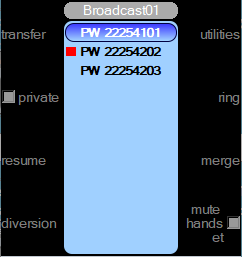
[Preset Key] [Call Key] 3. Line Status When you press the PRESET (or talk) key, the active menu is displayed, BUT the centre of the menu will have a list of Net Broadcast lines requested and a red colour icon is displayed next to the lines which were excluded by the turret.
To clear the Broadcast Once you have finished the broadcast you need to clear it. press clear …for appropriate handset Speaker actions1. The net broadcast shall be stopped, if the chosen broadcasting call on speaker is either moved to handset using “h-set” button or cleared using “clear” button. 2. User shall not be allowed to talkback whilst the channel is active in Net broadcast. LogoffLogging off the turret whilst in active broadcast, shall stop the broadcast. |

 or
or  key to highlight net to add lines to
 or
or  navigation keys on the top of the LM20 to scroll to additional keypages whilst in Net Broadcast mode.