Configure


Configure |
|
| Trading and C&C > Netrix > Logging On and Off |
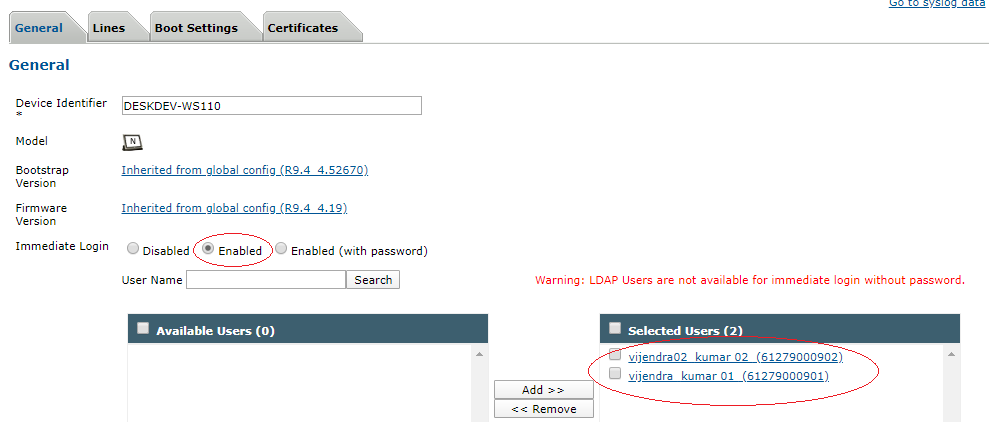
Automatic login on restart can be configured on Turret from TSS. Automatic login using immediate entryThis is a two-step process. 1. On Tss, go to 'Device Management -> Turrets'. Click on the turret to be configured for Automatic login. In tab 'General', set 'Immediate login' to Enabled. Enter the username in the search and add it to the list of 'Selected users' as shown below:
Click 'Update' at the bottom of the page. 2. Go to the 'Boot Settings' tab. Click on the 'Expert Mode' tab as shown below:
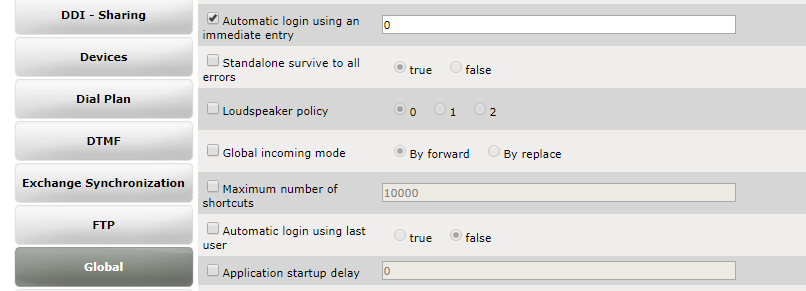
Click on 'Global' and checkbox for 'Automatic login using an immediate entry' as shown above. Enter a numerical value, 0, 1, 2, 3, 4, etc. The value of the field specifies which immediate login user will be used for auto-login. For example, specifying "0" will use the first immediate login user(61279000902) displayed in the 'Selected Users' list as shown in step 1.
Click 'Update' at the bottom of the page.
Automatic login using last userDefines if the turret, after a reboot, automatically performs a login, using the last user identifier that was logged in before the turret rebooted, if any. This includes any user login, that is manual or immediate. Follow Step 1) mentioned above for immediate login. For step 2) check box 'Automatic Login using last user' as shown below and make sure it is set to 'true'.
Click on 'Update' at the bottom of the page. |