Line Key Displays


Line Key Displays |
|
| Trading and C&C > Netrix > Introduction > Command Module (CM) |
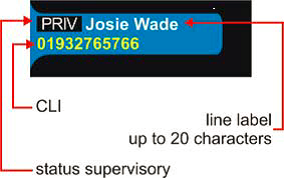
The line key displays are colour LCD. Each LM20 provides the key labels for 20 keys, arranged vertically. In addition, the keypage name is shown at the top of the display. Line keysThere is an LED under each key, which lights the edge of the key-top. The LED flashes to indicate an incoming call and is left on to indicate that it is connected to your handset/headset. Line labelsNetrix uses full-colour displays. Consequently, colour is used to distinguish between lines and line states. Line labels support up to 20 characters, and also display full calling line identity (CLI) and supervisories for the current line state. Each label can display two rows of characters, the top row for the line label allows for mixed case characters, the bottom row is always upper case. Labels are clearly associated with either left- or right-hand keys. The supervisory status of the line is displayed in the line label.
The above example shows an outgoing call made here, privacy enabled. Colour schemesThere is a range of different colour combinations that can be used for line labels. This means that different types of keys can be distinguished by different use of colour. For example, you may want your DDI keys to be pink, speed dial numbers yellow and so on. Each colour scheme is made up as follows: • background tab The labels make use of a 'tab' that sits on a black background. The tab expands in height as the key changes from inactive to active, making room for a second line of text. • primary colour which applies to the calling line identity (CLI) for the call • secondary colour which applies to the key label text. |