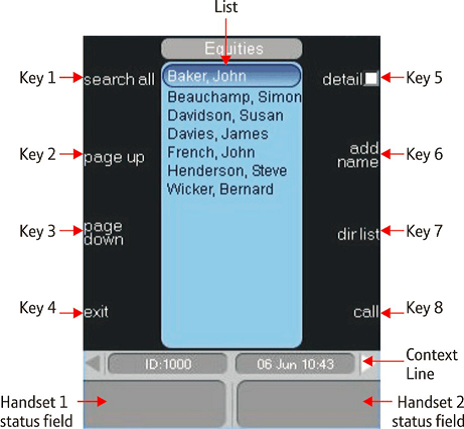
Application Display


Application Display |
|
| Trading and C&C > Netrix > Introduction > Command Module (CM) |
The application display provides access to context-sensitive function menus used to configure and operate Netrix.
The application display is divided into distinct sections: Context lineThe context line (just above the handset fields) is divided into three separate sections: •left-hand side displays the users' log on ID. •right-hand side displays the date and time. •grey arrows (navigation indicators). If a secondary page of options exist for the menu currently shown in the application display, the right-hand arrow turns white. If the secondary menu is displayed the left-hand arrow turns white to indicate a primary menu. The context line is also used to display: •status updates – for example if a download to the turret is performed status update messages are displayed whilst it is in progress. •prompts – to assist you when you need to perform an action as part of an operational procedure. For example, an error message is displayed if you try to barge a line that is “private-hold” by another user. The context line is always present. Handsets 1 and 2 status fieldsDisplays status information on the call currently connected to the handset. It includes the telephone number dialled, the status of the call such as private and calling line identity (CLI). There is a handset status field for each handset. ListThe list is presented where appropriate, for example it displays records when viewing call lists. Alternatively, this area is used for: •inputting text or numbers where required. For example adding names and telephone numbers when adding contacts. •status prompts that require confirmation before proceeding, e.g. confirming log off. |