Answering a Call


Answering a Call |
|
| Trading and C&C > Netrix > Basic Call functions > Usage |
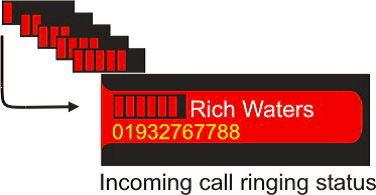
An incoming call is distinguished by its flashing indicator, and audible alert (if the key is alarmed). You answer the call by simply pressing the line key. The progress bar displayed alongside the keys label indicates how long the call has been ringing for. Calling line identity (CLI) is also displayed if provided. hear audible alert (if set)
indicator red- FAST FLASH press line key …to answer status label HS 1/HS2 …the call on handset menu is displayedSoftkeysIf you receive an incoming call for a key not programmed on the currently viewed keypage it is displayed on a softkey. Softkeys look and behave like actual keys. If you have a call on a soft key and navigate to the keypage where the key for the call exists, the call is moved from the softkey and displayed on its key. If there are more incoming calls to be displayed than soft keys to display them on, the calls are displayed on their alarm profile priority setting as and when softkeys become available or you navigate to a keypage where the specified key exists.
|