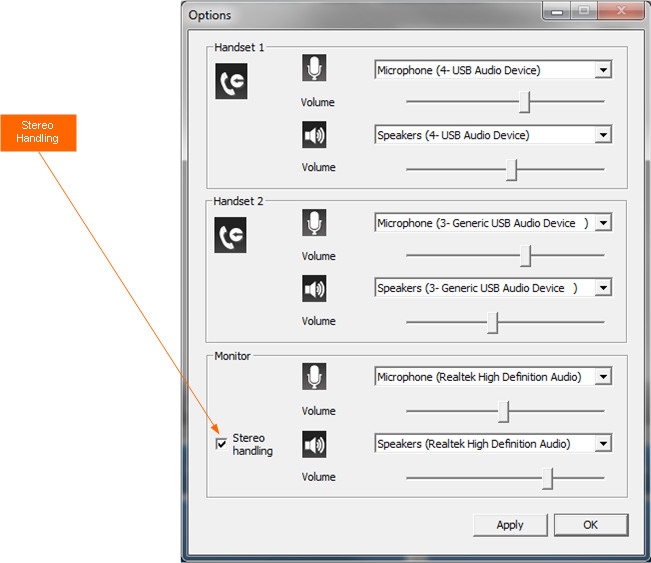
Stereo handling


Stereo handling |
|
| Software Solution > FlexPro > Configure |
By managing stereo handling in the FlexPro environment, the user will be able to assign a call on the left or right ear of the headset. This can help with separating multiple audio channels that are speaking simultaneously.
A stereo device must be associated to LD/MIC.
When stereo handling check box is checked: Left Loudspeaker (LD1) device represents the left earphone of headset HF1 device represents the left logical microphone of headset Right Loudspeaker (LD2) device represents the right earphone of headset HF2 device represents the right logical microphone of headset
Attention points:
•The call on the handsets (HS1 or HS2) is always hear on both earphones of headset.
•Ringtones are always played on both earphones of headset.
•DTMF play tone for outgoing call (the call is not yet established) is always played on both earphones of headset.
•The virtual center loudspeaker is not taken into account for this feature. When it is chosen, it is replaced by left loudspeaker.
•When the device association configuration is changed, FlexPro must restart.
Use cases:
User makes the call from the left monitor slot•Initial situation A user is logged in FlexPro with the primary line 1000. Stereo handling is enabled. He is working with a left monitor applet and a right monitor applet.
•Scenario User selects a left monitor slot and makes a call to the IP phone 1002. 1002 answers the call, and then it is established.
Result: the user hears the IP phone on the left of the headset. User makes the call from the right monitor slot•Initial situation A user is logged in FlexPro with the primary line 1000. Stereo handling is enabled. He is working with a left monitor applet and a right monitor applet.
•Scenario User selects a right monitor slot and makes a call to the IP phone 1002. 1002 answers the call, and then it is established.
Result: the user hears the IP phone on the right of the headset.
|