Provisioning JSON


Provisioning JSON |
|
| IT&Operations > Bulk Administration & Provisioning > Provisioning |
JSON (JavaScript Object Notation) is a lightweight data-interchange format which is slowly replacing older text based data representation formats like CSV and XML. It is more flexible than CSV and keep its readability when dealing with objects containing a lot of properties.
JSON provisioning allows to set almost every properties of objects, only those that are actually mandatory for the system are mandatory in provisioning and properties order doesn't matter.
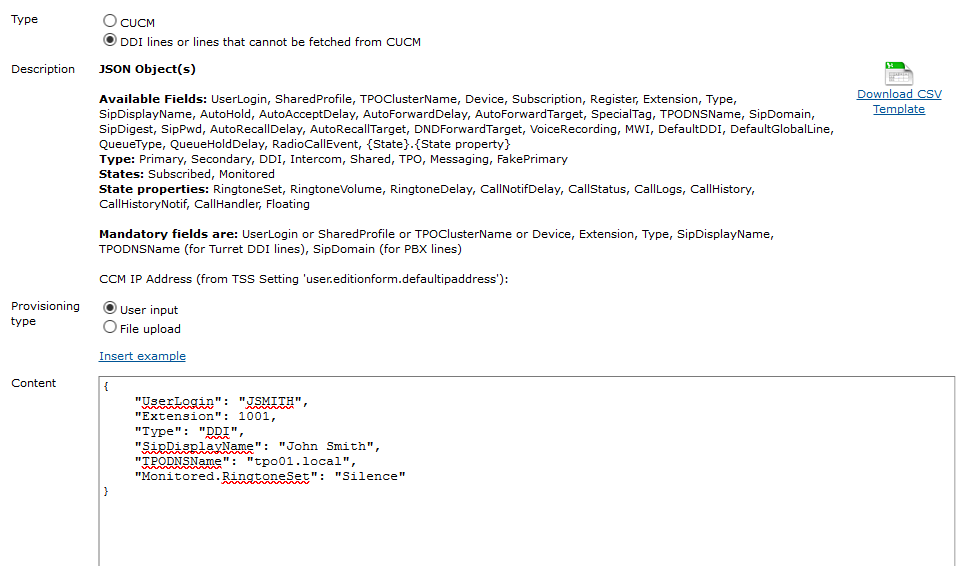
As shown on the capture above, the administrator can either provide JSON by pasting raw content, or by directly uploading a file containing its JSON document.
Internet is full of tools that allow to convert data in different formats to JSON.
E.g. This tool allows to convert CSV - that may be exported from excel - to JSON. Note that it needs configuration : "First row is column names" in step 2 and "Do Not output field/value pair if value is empty" in step3 need to be checked.
In example, the following excel sheet
may be copy pasted to this tool: http://www.convertcsv.com/csv-to-json.htm which gives the following CSV input
device userlogin sharedprofile tpoclustername extension type sipdisplayname tpodnsname S1 3098 ddi DDI Line 3098 main.tpo S1 3099 ddi DDI Line 3099 main.tpo User 2 3101 ddi DDI private Line main.tpo
and that the tool converts to the following JSON output
[ { "device": "", "userlogin": "", "sharedprofilename": "S1", "tpoclustername": "", "extension": 3098, "type": "ddi", "sipdisplayname": "DDI Line 3098", "tpodnsname": "main.tpo" }, { "device": "", "userlogin": "", "sharedprofilename": "S1", "tpoclustername": "", "extension": 3099, "type": "ddi", "sipdisplayname": "DDI Line 3099", "tpodnsname": "main.tpo" }, { "device": "", "userlogin": "User 2", "sharedprofilename": "", "tpoclustername": "", "extension": 3101, "type": "ddi", "sipdisplayname": "DDI private Line", "tpodnsname": "main.tpo" } ]
This output can then be copy-pasted to a provisioning page. |