Migrating from 9.2 version


Migrating from 9.2 version |
|
| Release Notes 10.1 > New Features > Migration |
FTP write access deactivationStarting from 9.3, the IPTrade devices do not require having an anonymous access to write files on the FTP site anymore.
The anonymous write access on FTP must be disabled for security purposes. However, keep in mind that this access must remained enabled if other versions, such as 8.X, 9.0, 9.1 or 9.2 are still running and using the same FTP site.
TSS on a Virtual ApplianceOn a TSS running in a Virtual Appliance, the Component Manager allows controlling (enabling and disabling) the FTP anonymous write access from the FTP Server Configuration page. TSS on a standard serverTo disable the access on Windows, follow the procedure below:
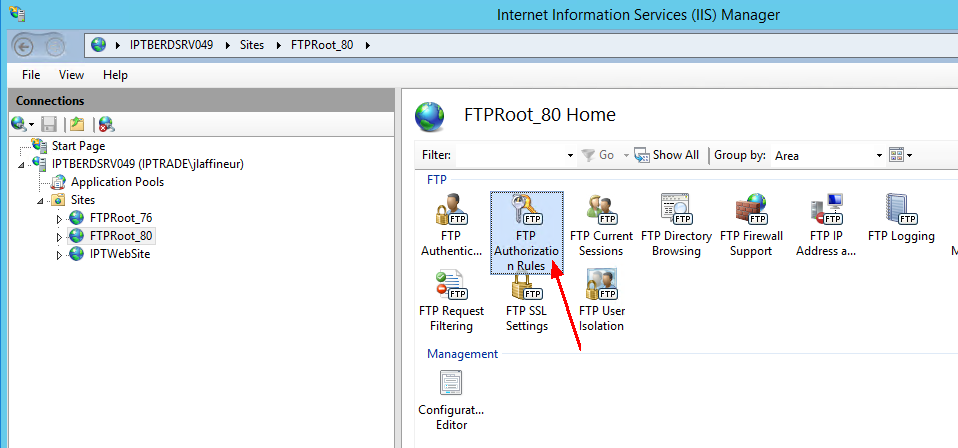
1. In Windows, open Internet Information Services (IIS) Manager, select the FTP site used by the 9.3 version and double-click the FTP Authorization property.
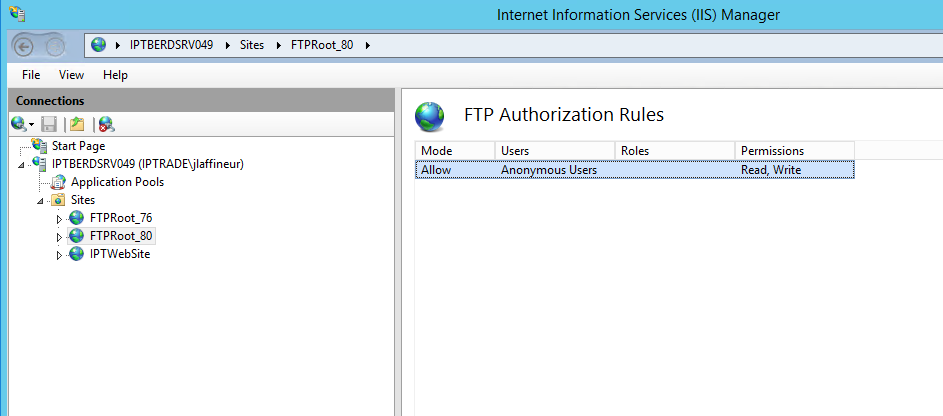
2. Double-click the authorization rules that applies to Anonymous Users.
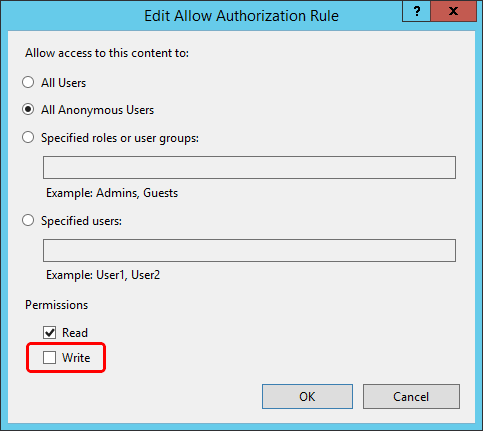
3. Un-check the Write checkbox under Permissions and press OK.
 Syslog server changed to a Windows Service (TSS Settings > Syslog)In version 9.3, the logging service has been moved to an independent Windows Service (IPTRADE Logging Service), which is installed with the TSS Firmware. In order to work correctly, you must set all syslog.enable.x (TSS Settings) to false in TSS version prior to 9.3.
TSS Events have been migrated to separated log filesIn version 9.3, by default the TSS won't store its events inside the database anymore. Thus, the "Events" link of the TSS (System > Monitoring) has been removed.
PBX ClustersAfter the TSS firmware upgrade, administrator must review the TSS console to remove "application.sip.proxy.address"and "application.sip.server.name" that might subsist in the Device/Shared/User configuration which can impact the PBX cluster settings (the only setting that must remain outside of the PBX cluster object is "application.sip.localdomain"). |