Prepare USB Flash Drive


Prepare USB Flash Drive |
|
| Solution Installation > Turret/Console Installation > Upgrade OS Image > Use Bootable USB Flash Drive |
You can use a USB flash drive (preferred) or an external USB hard drive. If using a USB flash drive, it must be at least 16 GB (or larger, depending on the total size of the Ghost image files provided on the Extranet).
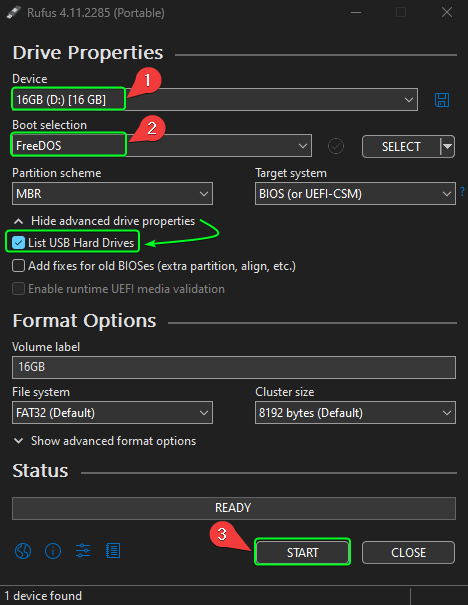
1.Plug in a USB flash drive (or USB hard drive) 2.Extract "Ghost-Restore.zip" (Provided in BT Extranet > Content > Firmware > Platform > OS Images) 3.Locate and run the Rufus application executable (eg: rufus-4.11p.exe) found in the \Rufus folder. 4.Under "Device" select your USB flash drive (or USB hard drive) 5.Under “Boot Selection” choose “FreeDOS” (This will format the device and make it DOS-bootable) 6.Click “START” to begin. The selected USB flash drive or external hard drive will be formatted, and the necessary FreeDOS boot files will be installed. 7.Once the process is complete, you can close Rufus
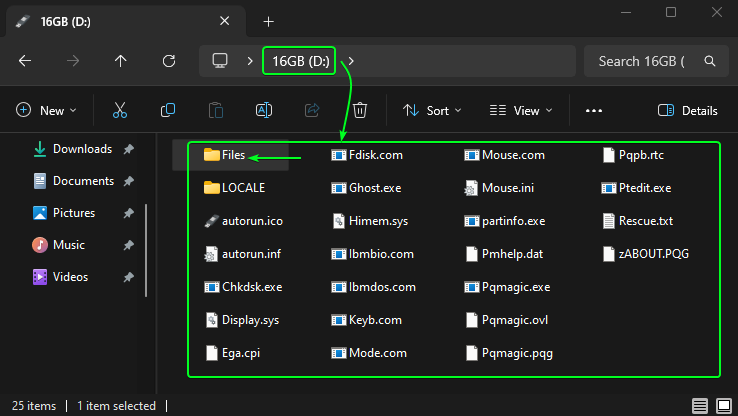
8.Locate the “\Ghost Files” folder within the extracted “Ghost-Restore.zip” archive. Copy all files from this folder into the root directory of the USB Flash Drive or USB Hard Drive. 9.Create a new folder called "Files" in root directory of the USB Flash Drive or USB Hard Drive. You should end up with the below.
10.Download the latest OS image from the BT Extranet > Content > Firmware > Platform > OS Images > T4 > IPT10-2021-T4-E3845-01 11.The USB Flash / Hard Drive preparation is now complete.
|