Temporary activation on handset


Temporary activation on handset |
|
| Enterprise Telephony > Common > Conferencing > Simplified Conference > Usage |
The Simplified Conference feature can also be activated at will by the user. If he/she does not wish to have the feature permanently activated, he can temporarily enable it on a specific call by pressing the Conference button.
This allows taking advantage of the simplified conference mechanism only when needed. The two simplified conference setting keys must be disabled for this feature to make sense.
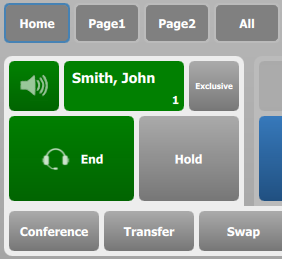
First, a call is established with John:
At this point, pressing Jack's call key would initiate a new call, but on the other handset, which is not what we want.
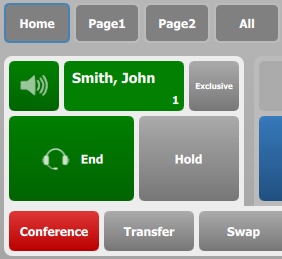
Press the Conference button. This does not initiate a conference as it normal would, but instead, it toggles the temporary simplified conference mechanism, and the Conference button turns purple:
At this point, pressing Jack's call key will initiate a call on the same handset, for conference. The workflow now follows the simplified conference workflow described in Basics - outbound.
The operation can be repeated several times to add multiple participants, each time pressing a remote party's call key in the interface, as long as the temporary Simplified Conference is on.
Once the conference is established, or if the call is terminated, the Conference button is reset to its initial state.
|