TPO mode


TPO mode |
|
| Enterprise Telephony > PBX dependent features > Call Park > Configure |
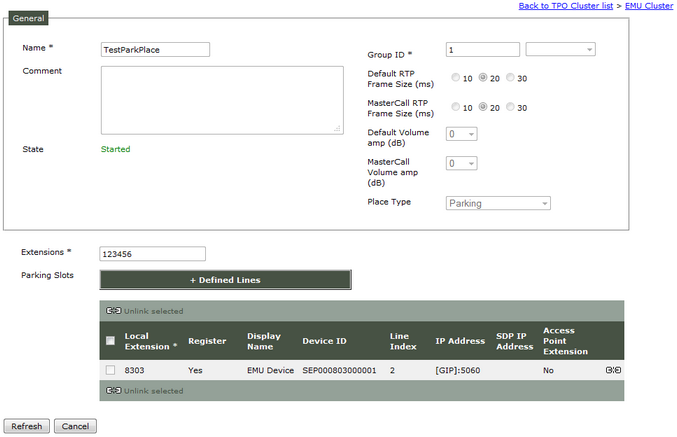
This mode is the default one used when PBX type is not Cisco. A parking place must be configured on the TPO used to park call and Boot Settings (TPOs) keys must be configured. TPO Parking Place configuration1)Open your preferred Internet navigator, connect to the TSS administration console URL and log onto the system with administrator privileges ; 2)From the main menu, select Device Management | TPO Cluster ; 3)From the list, edit the profile linked to the TPO e.g. EMU Cluster ; 4)Select the tab panel TPO Places and press Add new button ; the TPO place edition form is displayed ;
5)Fill in the TPO place edition form as per the table below :
6)Press Add and Go Back to commit changes; the newly created place is listed in the TPO places tab panel and reported as Stopped ; 7)Select Parking place and press Bulk admin selected | Start selected in order to mark them for starting ; 8)If PBX type is Alcatel, select the tab panel Settings | Global | Expert mode and set value of key Parking mode - Hangup on transfer (profile.setting.park.hangupontransfer) to true.
Boot Settings keys Turrets configurationYou have to change these Boot setting keys : 1)Open your preferred Internet navigator, connect to the TSS administration console URL and log onto the system with administrator privileges ; 2)From the main menu, select System / Models / Settings ; 3)Choose Version and File to apply to your turret and click on menu SIP ; 4)Change value of key "Parking mode" (application.sip.park.mode) to TPO ;
5)click on menu TPO ; 6)Change value of key "TPO Parking URI" (application.sip.TPO.park.uri) to "extension@TPOGroupName" (in this case : 123456@TPO_10.10.6.144)
User Profile configurationTo use parking functionality from a DDI Line, it must be tagged as Default DDI. |
|||||||||||||||||||||||||||||||||||||||||||||||||||||