Turret mandatory configuration


Turret mandatory configuration |
|
| Attendant Features > Group Intercom Over Cisco intercom lines > Configure |
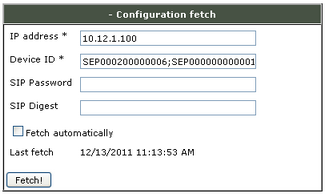
Configuration fetch
To keep a tally of the new intercom lines' configurations, a configuration fetch has to be done on the TSS Console as following
1)Open your preferred Internet navigator, connect to the TSS administration console URL and log onto the system with administrator privileges ; 2)From the main menu, navigate to Account management / Users - or - Account management / Shared Profiles 3)Select a user - or - select a shared profile 4)Select Lines tab 5)Fill in the Configuration Fetch section as follows and press Fetch! button a)IP address = <IP address> of the CUCM ; b)Device ID = SEPnnnnnnnnnnnn devices names as found in the CUCM phone list (all devices must be written separated by a ; or the lines won't be available) ;
Direct Intercom Mode
The talker and the remote users must be configured in the same Direct Intercom Mode
|
||||||||||