OAuth Configuration in TSS


OAuth Configuration in TSS |
|
| Solution Integration > OAuth > Configuration |
The below 4 keys/settings are mandatory in TSS in order to configure OAuth in the TSS. Follow below steps to add the configuration. 1.Login to TSS by any of the default IPT administrator accounts say "admin1". After successful OAuth configuration the default administrator accounts admin1, admin2 and admin3 should be disabled if not required anymore. 2.Go to System -> Settings -> TSS Settings -> OAuth. Go to Basic mode. 3.Set Enable OAuth Login to true. This will make "Azure AD Login" option available in login screen.
4.Set value for Application/client ID of the Azure application.
5.Set value for Azure Directory/tenant ID.
6.Set value for Azure Active Directory Instance URI. xxxxx
xxxxx 7.Client certificate
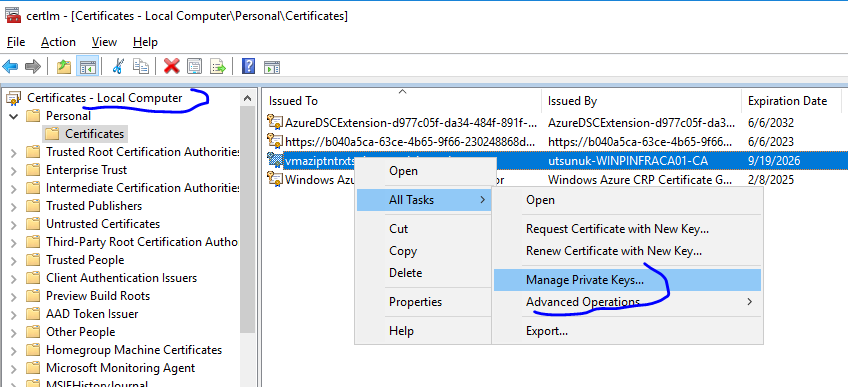
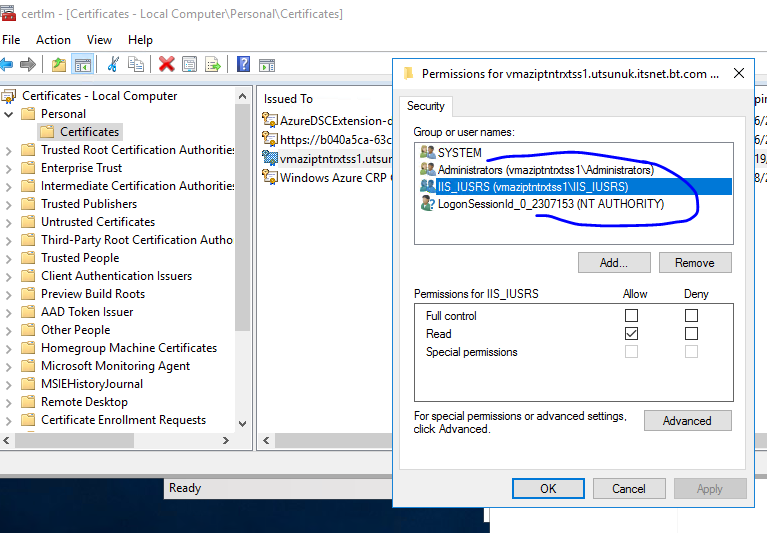
We need a certificate with private key(.pfx file) installed under Local Computer on web server, also give read permission to IIS_IUSRS for the private key as shown below. This can be done via opening certificate manager (Win + R → certmgr.msc → Enter).
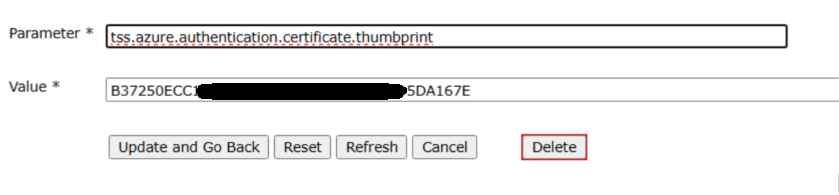
Configure the Thumbprint (whatever value in your certificate) in TSS settings. TSS will use this value to locate certificate to send to Azure. Key name will be tss.azure.authentication.certificate.thumbprint
8.The application must be reloaded for any TSS setting change, hence click on the link “Reload Application” at bottom of the TSS setting. 9.Logout from the current user to see OAuth login option.
|
||||||||||||||||||||||||||||||||||||||||||||||||||||