Turret configuration


Turret configuration |
|
| Trading and C&C > Direct Intercom > Configure |
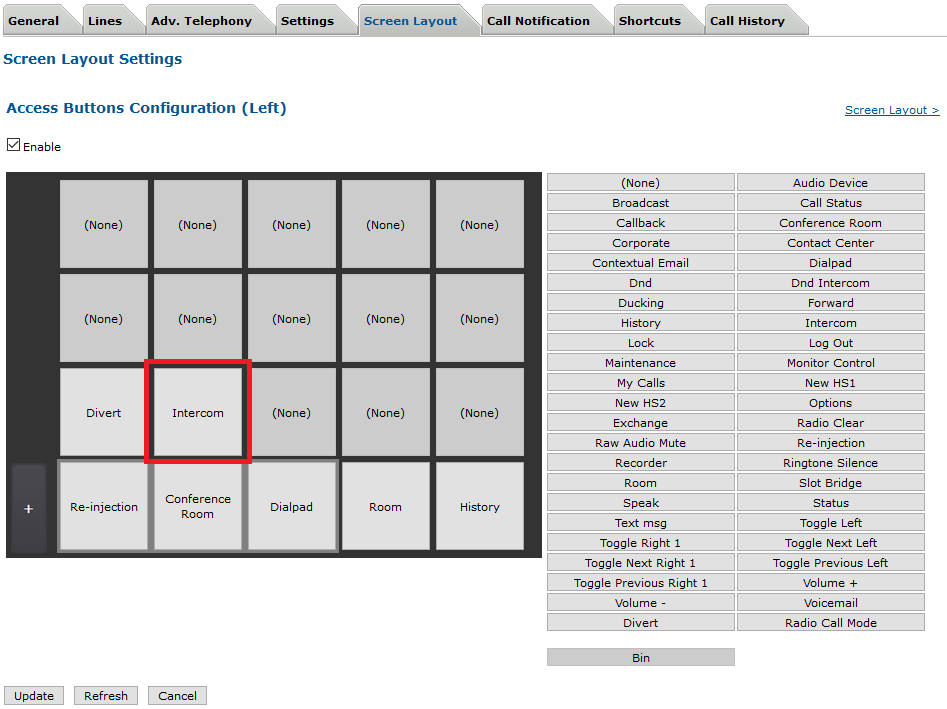
To see initiate direct intercoms, the user profile must allow accessing the Intercom panel, as shown below.
However, to speed up the access to direct intercoms, intercom shortcuts can be defined in the user's profile. Create a Direct Intercom shortcut
1)Open the TSS Administration Console and log onto the system with administrator privileges ; 2)From the main menu, edit a user or shared profile (select Account management > Users or Shared Profiles) 3)Select the Shortcuts tab and click Add New
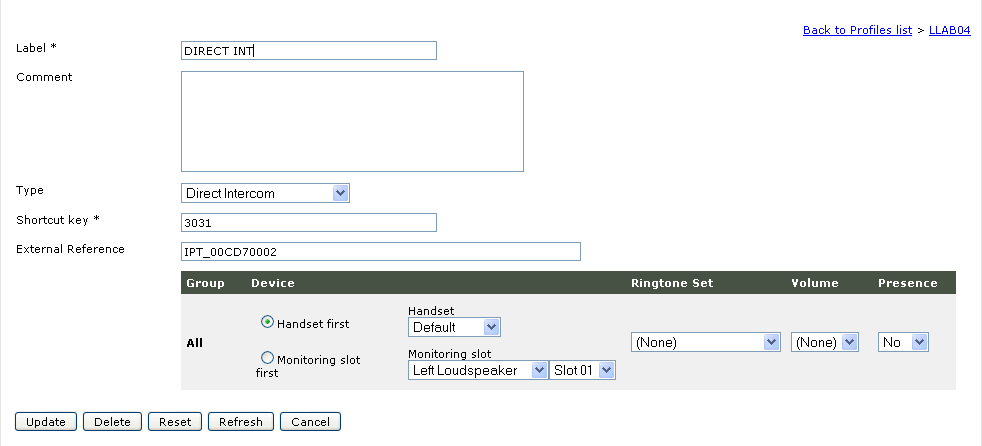
Fill the Label field with the name chosen for this intercom, select the Direct Intercom type and set the shortcut key with the number of the target. The target can have different values : - Primary Line extension when the user has one on the PBX. - Default Global Line extension when the user doesn't have a PBX Primary Line. Intercom panel access4)Additionally, you can add an Access button to allow the user to initiate direct intercoms (in User > Screen Layout > Access Buttons Configuration).
|