Enable Mixed mode


Enable Mixed mode |
|
| Solution Integration > PBXs > Cisco > Secure Communication > Configure > CuCM Setup > Mandatory Requirements |
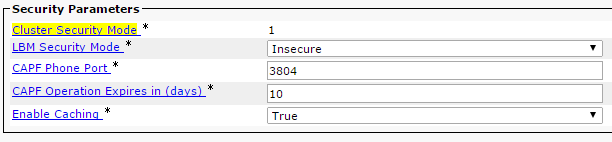
Check if the CuCM is in Mixed mode1. Log into the CuCM Administration console 2. Go to System -> Enterprise Parameters 3. Check if the setting ‘Cluster Security Mode” is 1. 0 means No secure mode 1 means Mixed mode
Activate CuCM mixed mode1. Obtain Administrative access to the CUCM Publisher node CLI 2. Enter the utils ctl set-cluster mixed-mode command into the CLI: admin:utils ctl set-cluster mixed-mode This operation will set the cluster to Mixed mode. Do you want to continue? (y/n):y Moving Cluster to Mixed Mode Cluster set to Mixed Mode Please Restart the TFTP and Cisco CallManager services on all nodes in the cluster that run these services admin: |