Check recording channels configuration


Check recording channels configuration |
|
| Standard > Troubleshooting Data: References > TPO > TPO Debug Information > Recording Information > How to check/track recorded call |
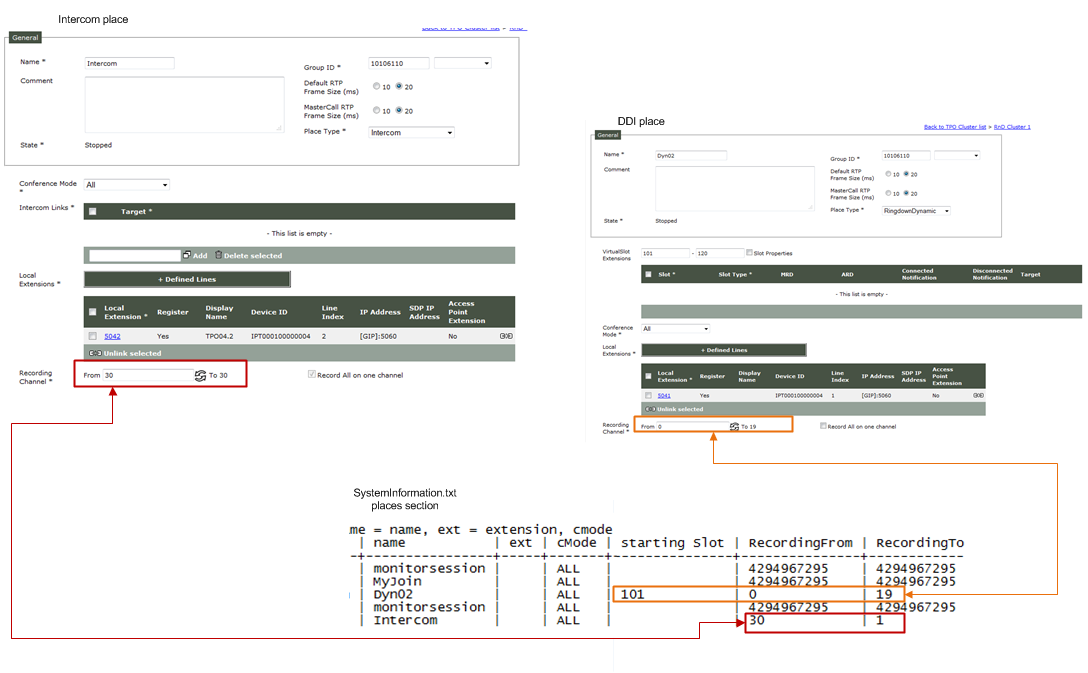
1.Open SystemInformation.txt file
2.Go to Places section
3.Open TSS administration console and go to the configured TPO cluster
4.Click on places panel and open Intercom place and the open DDI place to check the configured recording channels to the debug information present in the SystemInformation.txt.
•DDI line The fields recordingFrom and RecordingTo indicate the configured recording channels dedicated for this place.
RecordingFrom is the beginning of channel ID corresponding to the first DDI slot 101.
RecordingTo is the end of channel ID corresponding to the last DDI slot 120.
•Intercom Intercom place is recorded on 1 recording channel. Then, only the field RecordingFrom is relevant and it indicates the recording channel.
|