On Standard Win2012 Server


On Standard Win2012 Server |
|
| Basic > Troubleshooting Data: How to retrieve them > TSS > Wireshark Capture |
Since TSS is installed on a Windows 2012 Server Standard, Wireshark can be directly installed on the server to capture Network Traces.
Wireshark Software can be downloaded from their website: http://www.wireshark.org/download.html
The typical sequence of events when capturing a Network trace is the following:
1.Launch Wireshark 2.Open the “Capture Options” panel
3.Select the “Local Area Connection” interface 4.Press the Start button
5.Login the user on the turret 6.Reproduce the issue 7.Stop the Wireshark capture, pressing the 8.Save the Wireshark capture
|
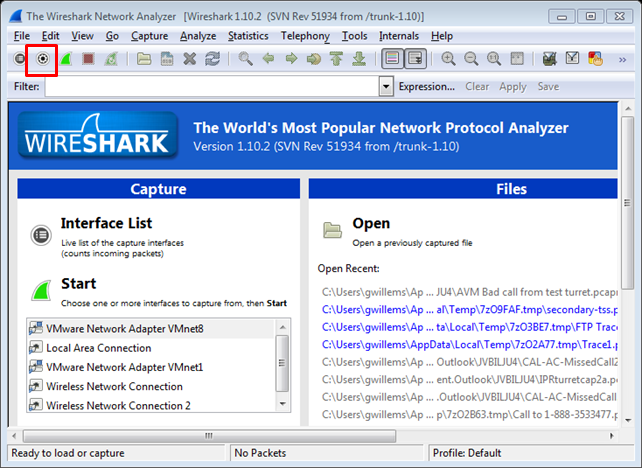
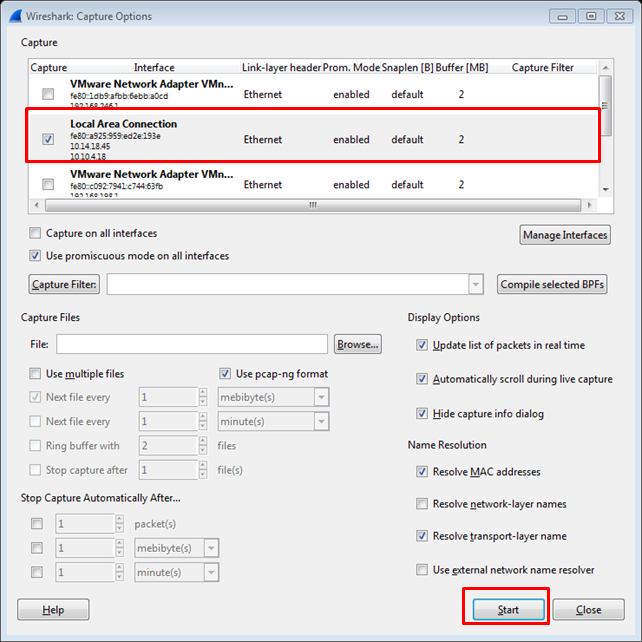
 button