Syslog and Application Logging


Syslog and Application Logging |
|
| Standard > Troubleshooting Data: References > Netrix |
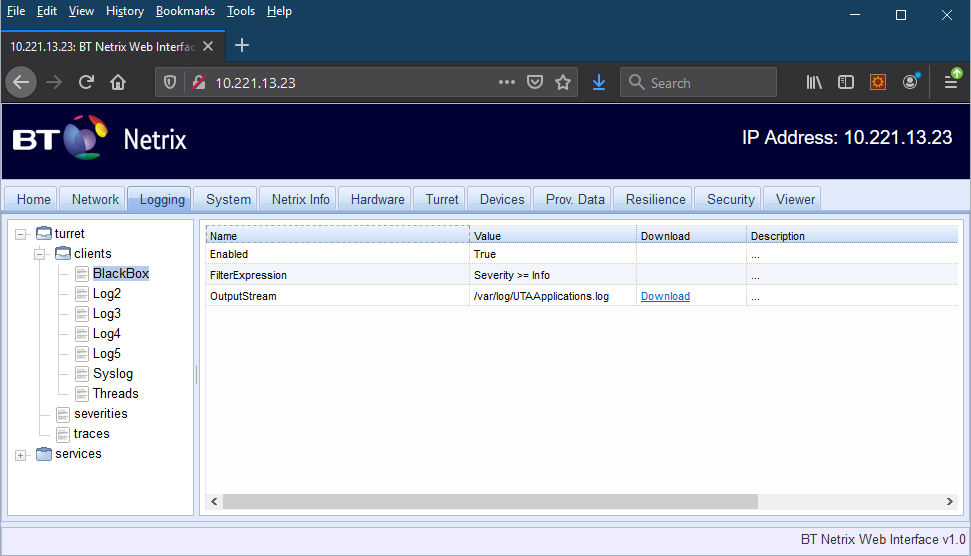
The turret application writes logging information to a log file that is collected by the watchdog and log collection scripts. Other information is sent to the Syslog server and can be retrieved via the TSS console under System > Monitoring > Syslogs. The amount of logging detail and the name of the file are configurable manually via the Netrix Web Interface and take effect immediately. Enter the turret’s IP Address into a web browser and select the “logging” tab. Expand the “turret” folder then “clients” folder and select either “BlackBox” or “Syslog”.
The default configuration can be overridden here and will be reset back to the default values on rebooting the turret. The filter expression can be used to limit or target detailed logging. The severity and trace name can be set to those listed in the corresponding folders. The default filter is as follows, Severity >= Info
A more complicated example for syntax purposes would be
((TraceName==ssapi || TraceName==network || TraceName==Turret || TraceName==signalling || TraceName==vr || TraceName==VRMsg) && Severity >= Debug) || ((TraceName==crm || TraceName==dialplan || TraceName==Tss || TraceName==gui) && Severity >= Info) || (Severity >= Warning)
Having set the logging level and performed the operations required, the current log file can be downloaded to a local file using the “download” link.
|