IEI devices


IEI devices |
|
| Standard > Troubleshooting Data: References > Turret > Turret Debug Information > DSPConfig files |
When a turret has basic audio functionality failure, it can be interesting to have a look to this file.
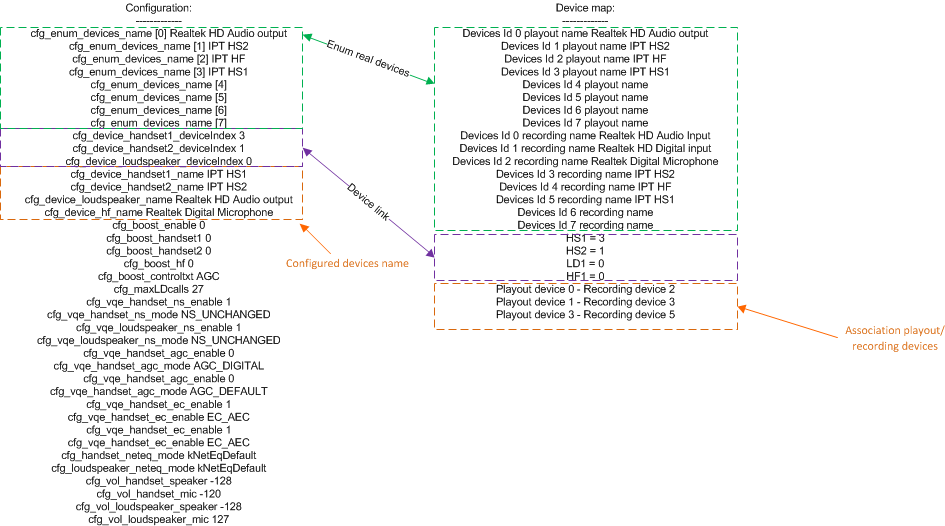
•The Configuration section indicates the setup of devices - cfg_enum_devices_name [0...n] Indicates a brief view of the audio devices plugged on the system, if three external audio devices are plugged and only two are seen (plus the internal one: Realtek HD Audio output), there is a problem (i.e. the device is not working) - cfg_device_handset1_name is the configured name to the handset1 device (HS1) - cfg_device_handset2_name is the configured name of the handset2 device (HS2) - cfg_device_loudspeaker_name is the configured name of the playout device (loudspeaker) - cfg_device_hf_name is the configured name of the recording device (microphone)
•The Device map section indicates the real devices found in the system. It enumerates a set of the payout devices and a set of recording devices. It also describes the association between playout and recording devices •The link between configuration and real devices is shown by the Device link in the above diagram. If the device link is showing a value equal to -1 (i.e HS1=-1) this device is not linked, which means that it will not work or will not work properly. Example: HS1 is 3 in the device map which corresponds to cfg_device_handset1_deviceindex 3 of configuration. The name of the device is IPT HS1.
The QoS section also gives you the default packet tagging value in the IP Diffserv field. |