Capture from Vitesse Switch


Capture from Vitesse Switch |
|
| Standard > Troubleshooting Data: References > Turret > XMA > Wireshark Capture |
Once mirroring is active on the PC port of the Vitesse switch, you can connect on that port a laptop with Wireshark installed:
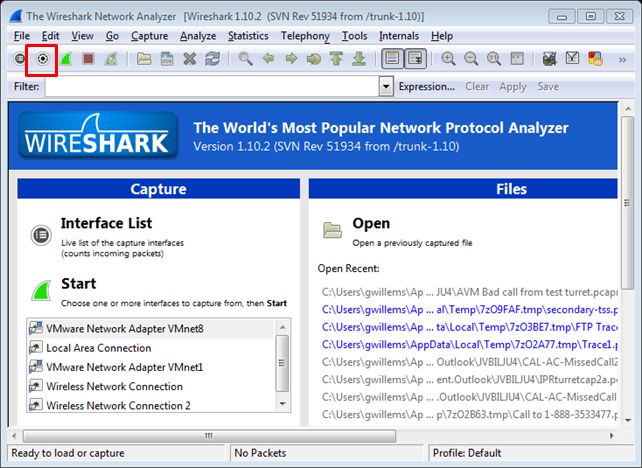
1.Launch Wireshark on the laptop 2.Open the “Capture Options” panel
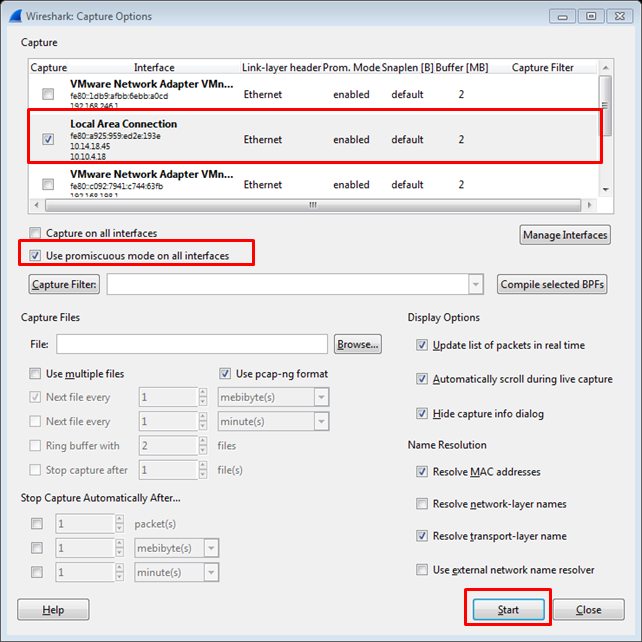
3.Select the “Local Area Connection” interface 4.Make sure Use promiscuous mode on all interfaces is enabled 5.Press the Start button
6.Login the user on the turret 7.Reproduce the issue 8.Stop the Wireshark capture, pressing the 9.Save the Wireshark capture
|
 button