Usage


Usage |
|
| Trading and C&C > Netrix > Voicemail |
Voicemail allows you to divert the voice call to a voicemail box and further options will available by IVR. The mandatory configuration is explained in the configuration section.
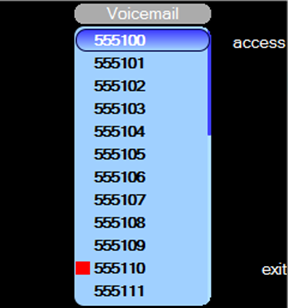
If the red indicator above the mail key on the Netrix lights up it signifies that a voice message has arrived in your voicemail box, or there are pending unheard messages. One DDI extension with voicemail enabledIf you have only one DDI extension with voicemail enabled, then to retrieve the message indicator red – on press mail …to access the voicemail box This will dial out to the voicemail box, when prompted, enter the appropriate passcode via the dialpad to retrieve your voice messages.Multiple DDI extension with voicemail enabledIf you have multiple DDI extension with voicemail enabled, then to retrieve the message: indicator red – on press mail …the list of DDI extensions is displayed. A red-square next to the DDI extension indicates a pending voicemail.
press …to highlight the DDI extension press access …to access the voicemail box This will dial out to the voicemail box, when prompted, enter the appropriate passcode via the dialpad to retrieve your voice messages.
|
 or
or 