Quick start


Quick start |
|
| Software Solution > FlexPro + XMA2 |
Prerequisites:
•The FlexPro + XMA2 installation package must be installed on the standard windows PC.
•As a VOIP application, it also needs an open running network connection.
•XMA2 board must be connected and operational before launching start FlexPro + XMA2.
Create Turret device:
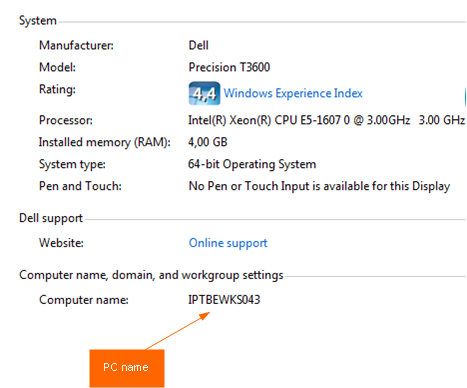
Before starting using the FlexPro + XMA2, the corresponding Turret device must be created in the TSS. By default, the corresponding Turret device name for the FlexPro + XMA2 is the computer name of the PC Go to Control Panel, System and Security, System
Example: if the PC name is IPTBEWKS043, the user must create a Turret device named IPTBEWKS043. *
1.Go to TSS Administration console, Device Management, Turrets 2.Click on the Add new button, fill the Device Identifier with the PC name (IPTBEWKS043) 3.Save
* Warning : the Turret device name must be CAPITALIZED in TSS. e.g. computer name : smith-pc, turret device : SMITH-PC
|