NIC adapter selection


NIC adapter selection |
|
| Software Solution > FlexPro + XMA2 > Usage |
Application launched just after installation
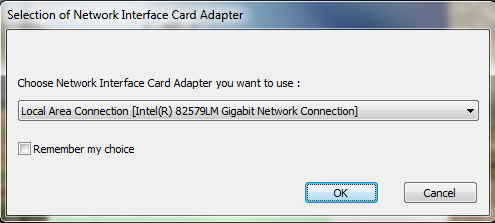
When FlexPro + XMA2 application is launched for the first time after installation, a popup window is displayed, asking for user to choose the Network Interface Controller (NIC : network connection) that must be used. Only connected NICs are available in NICs list including VPN NICs.
By default, selected NIC is the one chosen during installation. User can choose to remember his choice for next times by checking "Remember my choice" option.
Popup window always allows to: - validate choices and launch application by clicking "OK" button or "Enter" key; - cancel application launch by clicking "Cancel" button or "Esc" key.
Application launched after other executions
When application is launched, if user has not checked "Remember my choice" option last time, popup window asking for user to choose NIC that must be used is displayed and selected NIC is the last one chosen at previous startup or the first one in the list if last one chosen at previous startup is not connected.
If no NIC is connected, an error message is displayed and application doesn't start.
Popup window is not displayed
System starts application without user action if : - "Remember my choice" option has not been checked previously and only one NIC is connected. - "Remember my choice" option has been checked previously and NIC is connected.
Remarks
If user has checked "Remember my choice" option but NIC selected is not connected, popup window appears with warning message and invites user to select another NIC before launching application, even if only one NIC is connected. This new choice can be used as default one for next times by clicking "Remember my choice".
|